
SociableKIT
SociableKIT
close-icon
  • Home
  • Widgets

    Widgets

    socials

    Featured widgets

    • Google Reviews Widget
    • LinkedIn Feed Widget
    • Instagram Feed Widget
    • YouTube Channel Widget
    • Facebook Feed Widget
    • TikTok Feed Widget
    • X Feed Widget
    • Facebook Events Widget
    • Indeed Jobs Widget
    • YouTube Playlist Widget
    socials

    Aggregator widgets

    • Social Feed Widget
    • Reviews Widget
    • Content Aggregator Widget
    socials

    Google widgets

    • Google Reviews Widget
    • Google Business Profile Widget
    • Google Business Photos Widget
    • Google Calendar Widget
    • Google Play Reviews Widget
    socials

    Linkedin widgets

    • Linkedin Page Posts
    • Linkedin Profile Posts
    • Linkedin Page Jobs
    • Linkedin Recommendations
    • Linkedin Hashtag Posts
    socials

    Instagram widgets

    • Instagram Feed
    • Instagram Hashtag Feed
    • Instagram Reels
    • Instagram Story Highlights
    • Instagram Stories
    socials

    Facebook widgets

    • Facebook Page Events
    • Facebook Page Posts
    • Facebook Reels
    • Facebook Page Reviews
    • Facebook Profile Posts
    socials

    Youtube widgets

    • Youtube Channel Widget
    • Youtube Playlist Widget
    • Youtube Shorts Widget
    • Youtube Posts Widget
    • Youtube Live Stream Widget
    socials

    Tiktok widgets

    • Tiktok Profile Widget
    • Tiktok Hashtag Widget
    • Tiktok Playlist Widget
    socials

    Indeed widgets

    • Indeed Jobs Widget
    • Indeed Reviews Widget
    socials

    X (Twitter) widgets

    • X Profile Widget
    • X Feed Widget
    • X List Widget
    • X Jobs Widget
    view-widgets
    View all widgets
  • Pricing
  • Reviews
  • Social
  • Resources

    Resources

    • Tutorials
    • Blog
    • Demos
    • About Us
    • Support
    • Free Widgets
    • All Resources
Login Create a Widget

What are you looking for?

  • Home
  • Tutorials
  • Weebly
Kristen Williams Marc Maessen John Janowski Jules Webb ★★★★★ Rated 4.9/5 · 620+ Reviews

How to embed TikTok feed on your Weebly website for FREE?

Display your TikTok feed on your website to showcase engaging short videos, boost audience interaction, and bring your dynamic content to life in real time.

  • Select specific widget type:
  • Tiktok hashtag feed
  • TikTok Profile
Free forever plan No credit card Cancel any time
How to embed TikTok feed on your Weebly website  for FREE?
Photo of Mike Dalisay
Mike Dalisay Follow
Co-founder of SociableKIT · Helping small businesses since 2011
July 6, 2026 5 min read Ask ChatGPT
Quick answer

Your TikTok feed on Weebly website — live in 3 steps

SociableKIT syncs your tiktok feed automatically. Set up once, embed anywhere — free to start, no coding required.

  1. 1

    Create in 60 seconds

    Pick TikTok feed in the dashboard and connect your source.

  2. 2

    Match your brand

    Colors, fonts, layout — tune it until it feels native to your site.

  3. 3

    Paste one line of code

    Drop the embed snippet on your Weebly website. No dev team needed.

  • Select specific widget type:
  • Tiktok hashtag feed
  • TikTok Profile
  • Free forever plan
  • No credit card
  • Cancel any time
Full walkthrough

Embed TikTok feed with SociableKIT — step by step

Create your widget in the dashboard, copy the embed code, and paste it on your Weebly website. Screenshots included so you never get stuck.

Complete guide

Follow our complete guide below to embed TikTok feed on Weebly website for free. The guide is divided into two parts to make it easier to follow.

Create and customize your TikTok feed widget

The first part is creating your TikTok feed widget using the SociableKIT dashboard. Customize the look and feel to match your brand. Follow the steps below.

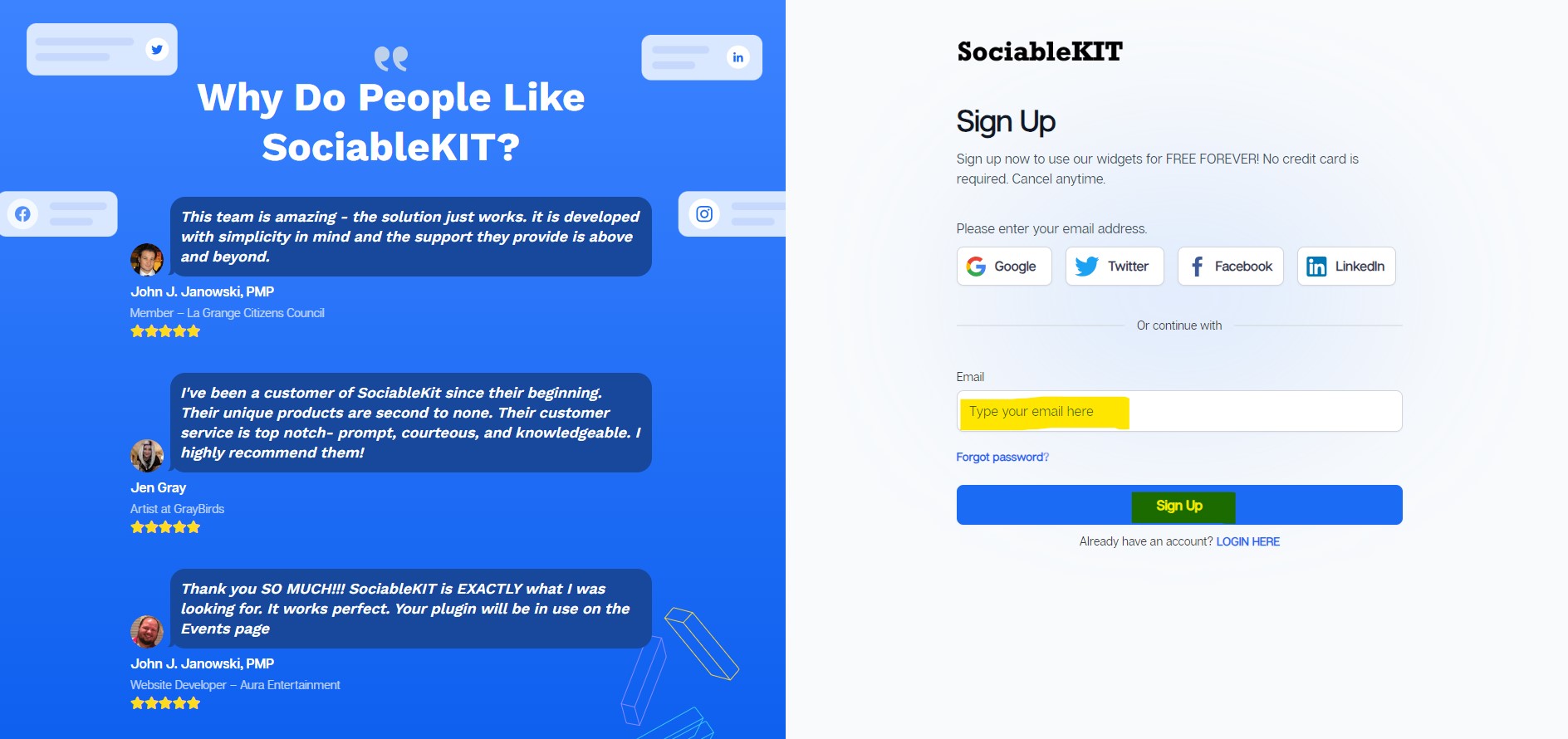
  1. Sign up FREE or login to SociableKIT. You can login here if you already have an account. Once you sign up, you will start your 7-day premium trial. After 7 days, you can activate the free plan if you don't need our premium features. Sign up to SociableKIT - How to embed TikTok feed on your Weebly website  for FREE?

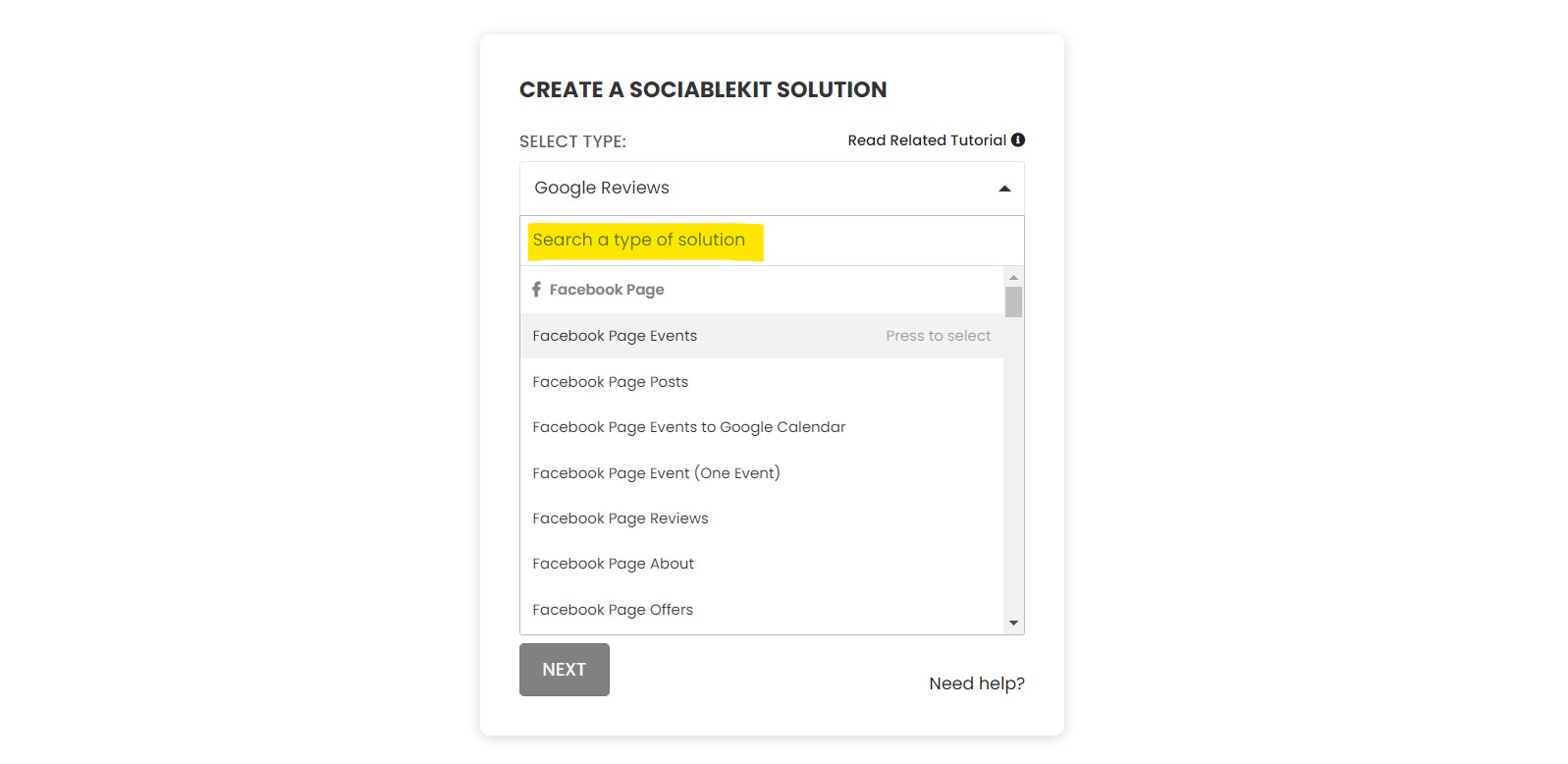
  2. Select your TikTok feed type on the dropdown. SociableKIT offers several TikTok feed widgets. You might need to search it using the highlighted area below. Once found, you can then select it. Here are the different types of TikTok feed that you can add to your Weebly website :
    • Tiktok hashtag feed logo
      Tiktok hashtag feed widget – Showcase TikTok hashtag feeds on your website to drive engagement, spotlight trending content, and connect your audience with your brand's community buzz. Learn how to embed Tiktok hashtag feed on your website.
    • TikTok Profile logo
      TikTok Profile widget – Embed your TikTok profile to captivate your audience with dynamic content, boost engagement, and amplify your brand’s social media presence. Learn how to embed TikTok Profile on your website.
    Select "TikTok feed" on the dropdown - How to embed TikTok feed on your Weebly website  for FREE?
  3. Enter your TikTok feed ID or username. Copy your TikTok feed URL and paste it in the username box. Our system will automatically identify your TikTok feed ID or username.
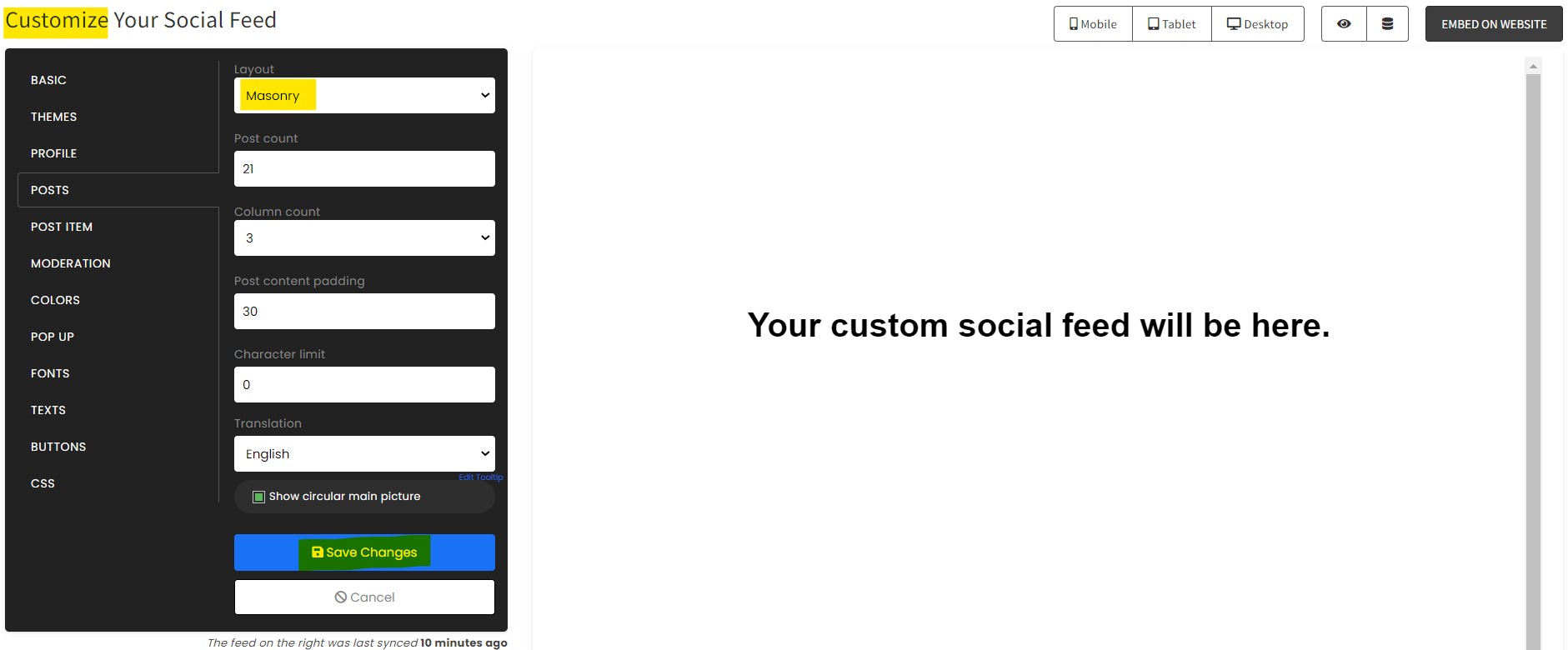
  4. Customize your feed. Click the "NEXT" button to show the customization options of your social feed. You can change the layout, colors, font, and more to match your brand. Click the Save changes button.Customize your feed - How to embed TikTok feed on your Weebly website  for FREE?
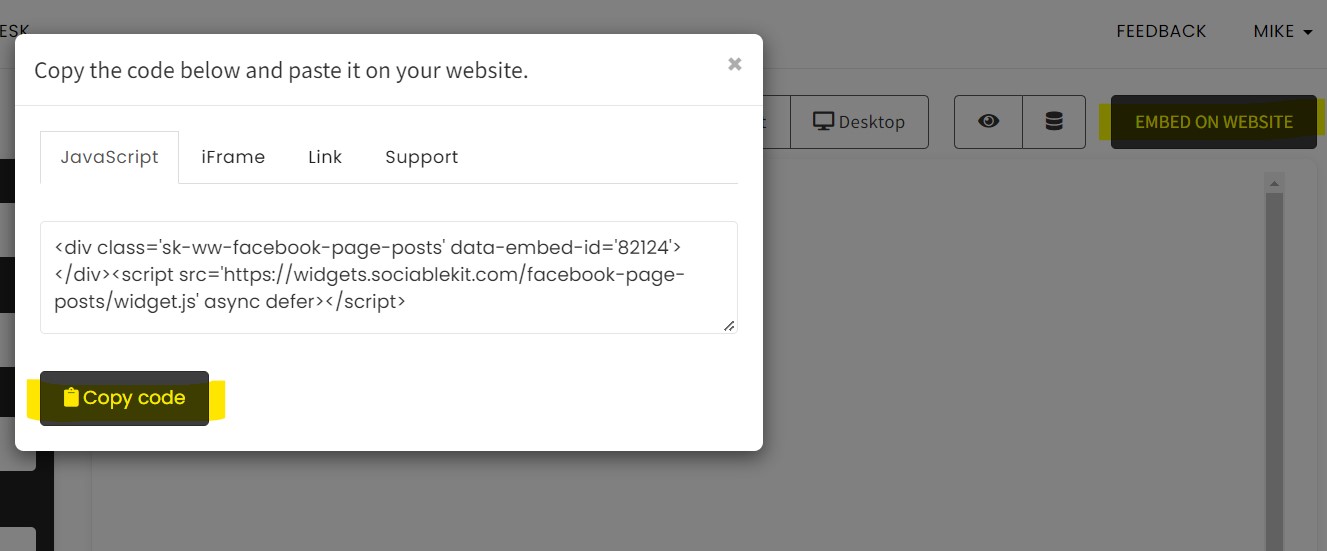
  5. Copy the embed code. Click the "Embed on website" button on the upper right corner. On the popup, copy the JavaScript embed code.Copy the embed code. - How to embed TikTok feed on your Weebly website  for FREE?
  6. Paste the embed code and save your Weebly website page. Please follow the second part below to add TikTok feed widget to your Weebly website .

Add TikTok feed widget to your Weebly website

The second part is adding your TikTok feed widget to your Weebly website . After you customize your TikTok feed widget and copied the embed code, it is time to add it to your Weebly website . Follow the steps below.

  1. Get your free embed code from SociableKIT. Make sure you followed the first part above to create your widgget, customize it, and copy your free embed code.
  2. Log in to Weebly. 
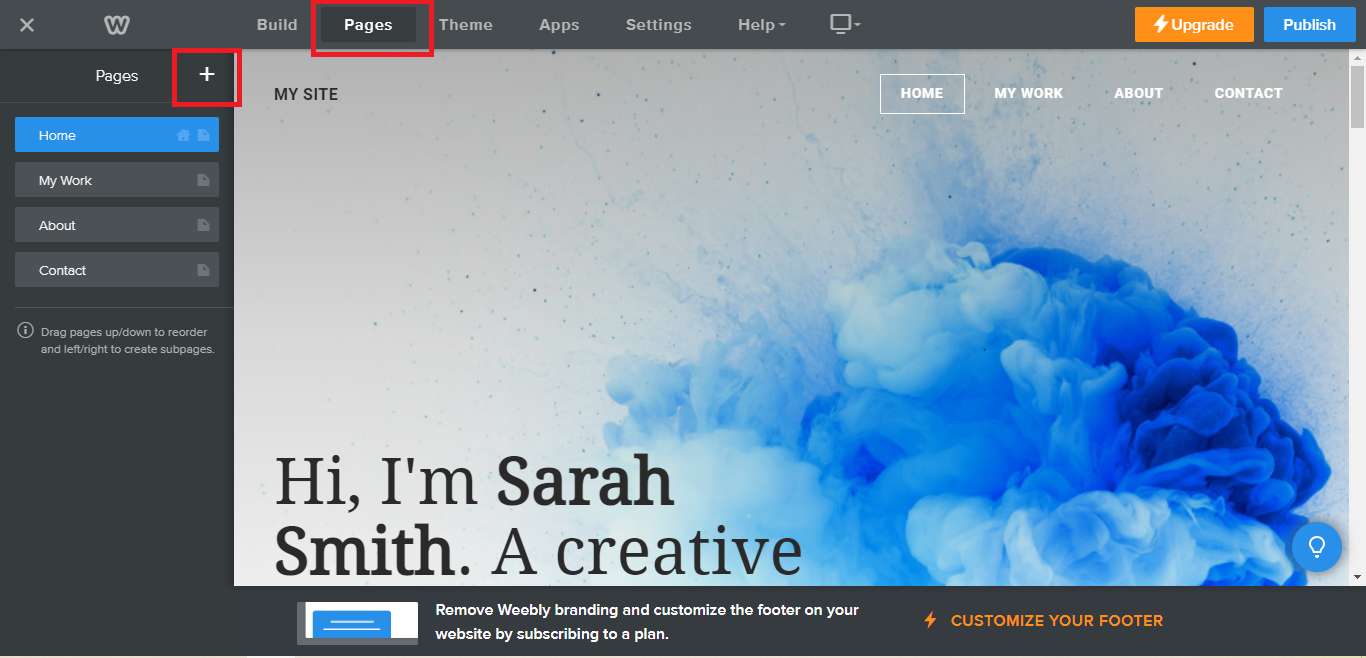
  3. On your existing website on Weebly, click the "Pages" section on the upper left then click the "+".
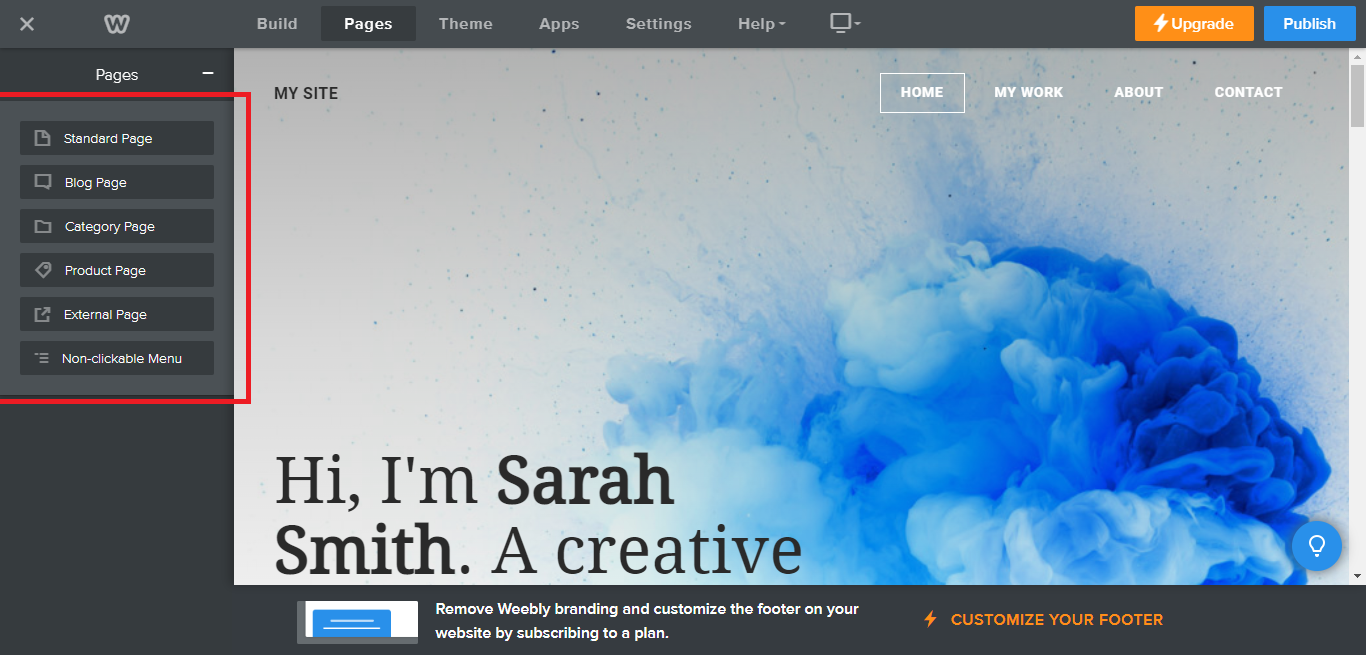
  4. Select what type of page you want to add.
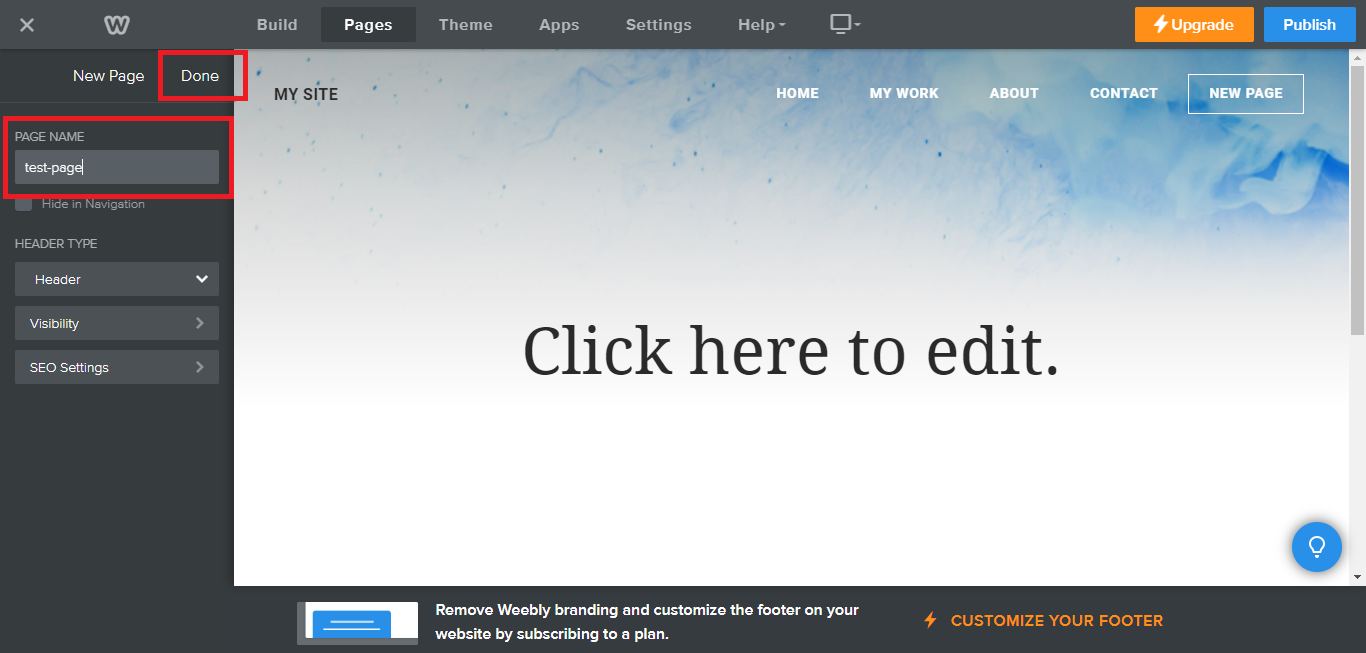
  5. Add a name to your page and then click "Done".
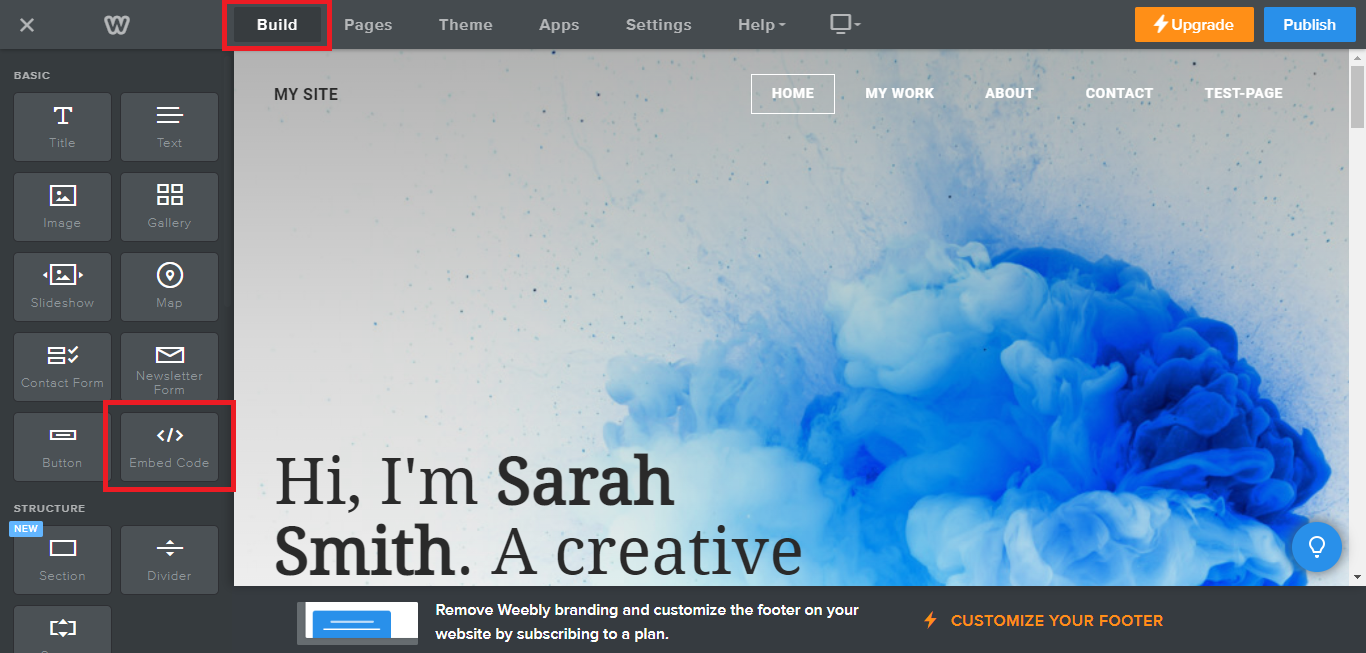
  6. On the top menu, click "Build" then on the sidebar, drag the "Embed Code" option on your page. 
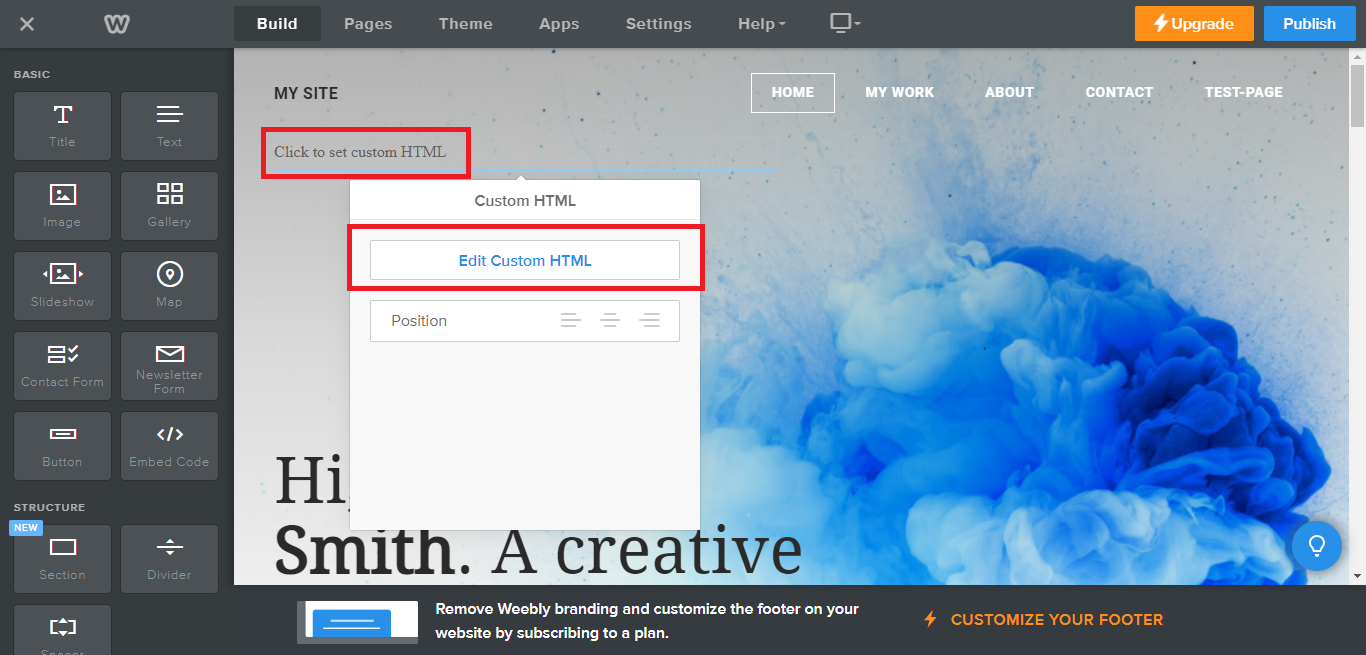
  7. Click the "Click to set custom HTML" then click "Edit Custom HTML". 
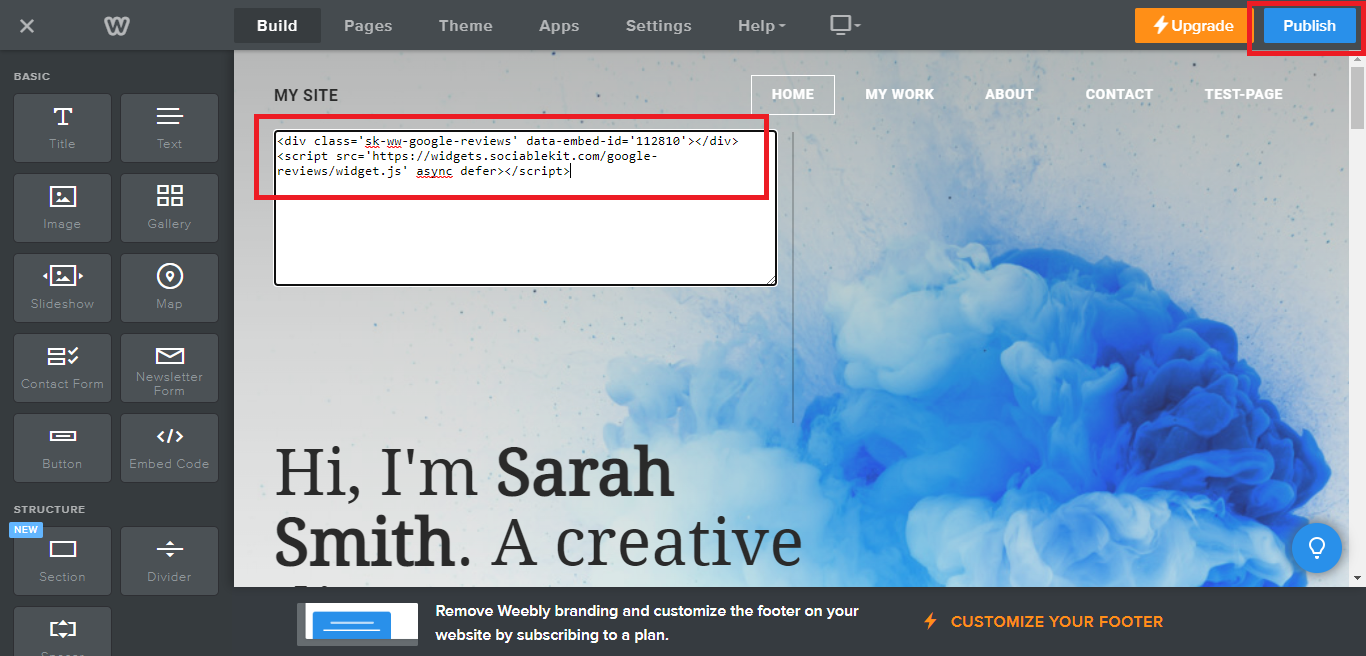
  8. Paste the code you copied from SociableKIT then in the upper right corner, click the “Publish” button. 
  9. Click the link to your site. Done!

Alternative method

Use the embed or link option

Prefer a manual approach? Follow these steps to link or embed TikTok feed without a third-party widget.

Share your TikTok videos on your website, without the need for a third-party plugin like SociableKIT. Follow the steps below to explore this alternative approach.

  1. Go to your TikTok profile.
  2. Choose a TikTok video you want to embed.
  3. Click the embed button beside the share buttons.
  4. On the popup, click the Copy code button.
  5. Login to your website admin panel.
  6. Create or update a page where you want to put your TikTok videos.
  7. Use the embed option of your website builder and paste the embed code you copied earlier.
  8. Save your page. Done!
  9. To create the TikTok feed on your website, you need to repeat steps 1 onwards to add more TikTok videos.

You may choose method 1 or method 2, it depends on your needs. But in case you choose method 1, you can follow our complete guide below.

Website builders

Paste your embed code on any platform

SociableKIT works with every major website builder. Pick yours below for copy-paste instructions tailored to that platform.

To embed TikTok feed on your Weebly site, follow the steps below after you have your SociableKIT embed code.

  1. Sign up free to SociableKIT and create your TikTok feed widget.
  2. Customize your widget and copy the embed code from the dashboard.
  3. Log in to Weebly. 
  4. On your existing website on Weebly, click the "Pages" section on the upper left then click the "+".
  5. Select what type of page you want to add.
  6. Add a name to your page and then click "Done".
  7. On the top menu, click "Build" then on the sidebar, drag the "Embed Code" option on your page. 
  8. Click the "Click to set custom HTML" then click "Edit Custom HTML". 
  9. Paste the code you copied from SociableKIT then in the upper right corner, click the “Publish” button. 
  10. Click the link to your site. Done!
Full Weebly tutorial →

To embed TikTok feed on your WordPress site, follow the steps below after you have your SociableKIT embed code.

  1. Sign up free to SociableKIT and create your TikTok feed widget.
  2. Customize your widget and copy the embed code from the dashboard.
  3. Login to your WordPress site. 
  4. On your WordPress, go to the "Pages" section then click the "Add new page".
  5. Pick a pre-defined layout or start with a blank page by clicking the "Blank page" button.
  6. On the body of your page, click the "+" icon and click the "Custom HTML".
  7. Paste the code in the text area and click update.
  8. The widget will appear on the WordPress page.
  9. Click the Publish or Update button on your WordPress page. 
  10. Click the view page. Done!
Full WordPress tutorial →

To embed TikTok feed on your Wix site, follow the steps below after you have your SociableKIT embed code.

  1. Sign up free to SociableKIT and create your TikTok feed widget.
  2. Customize your widget and copy the embed code from the dashboard.
  3. Login to Wix. 
  4. On your existing website click the "+" button beside the "Main pages" section.
  5. Then click the "Add page" button.
  6. Name your page then hit enter.
  7. On the left, click "Add element". Find and click "Embed code". Click and drag "Embed a site" on your page then resize the container. 
  8. Click "Change website address". 
  9. Paste the link you copied from SociableKIT then click "Apply".
  10. Click "Publish" on the upper right. 
  11. Click "View site". Done!
Full Wix tutorial →

To embed TikTok feed on your Squarespace site, follow the steps below after you have your SociableKIT embed code.

  1. Sign up free to SociableKIT and create your TikTok feed widget.
  2. Customize your widget and copy the embed code from the dashboard.
  3. Login to Squarespace. You must have a "Business" account in Squarespace to use the widget. The "code block" needed cannot be found if you only have a "Personal" account.
  4. Create a new blank page or edit your existing page. Identify which page you want the widget to appear. You can create a new page on Squarespace, or you can edit your existing page where you want the widget to appear.
  5. Add a Code Block. On your Squarespace page, click the 'Edit' button. Find the 'Code' block and click it.
  6. Paste the embed code from SociableKIT. On the 'Content' of the 'Code' block, paste the JavaScript embed code you have copied from your widget.
  7. Save the changes on the 'Code block'. After pasting your widget's embed code. Click the 'Save' button on the left part of the page.
  8. View your page. Refresh your Squarespace page and check your SociableKIT widget. Done!
Full Squarespace tutorial →

To embed TikTok feed on your Webflow site, follow the steps below after you have your SociableKIT embed code.

  1. Sign up free to SociableKIT and create your TikTok feed widget.
  2. Customize your widget and copy the embed code from the dashboard.
  3. Login to Webflow. 
  4. On your existing website, click the "Page: ...." in the upper left corner then click the "Create new page" icon.
  5. Once done add a name for your new page then click "Save".
  6. On the left, click "Add Element". Drag "Embed" to your page. 
  7. Paste the JavaScript code you copied from SociableKIT.
  8. On the upper right, click "Publish" > "Publish to Selected Domains". 
  9. View your page. Done!
Full Webflow tutorial →

To embed TikTok feed on your Shopify site, follow the steps below after you have your SociableKIT embed code.

  1. Sign up free to SociableKIT and create your TikTok feed widget.
  2. Customize your widget and copy the embed code from the dashboard.
  3. Login to Shopify. 
  4. On the left side, click Online Store. 
  5. Click Pages. Add a new page or edit your existing page.
  6. On the Page details, click Show HTML icon (<>). 
  7. Paste the embed code and click the Save button.
  8. Click the View page button. Done!
Full Shopify tutorial →

To embed TikTok feed on your HTML site, follow the steps below after you have your SociableKIT embed code.

  1. Sign up free to SociableKIT and create your TikTok feed widget.
  2. Customize your widget and copy the embed code from the dashboard.
  3. Open your HTML file.
  4. You can create a new HTML page or edit your existing HTML page.
  5. Paste the Javascript code you copied from SociableKIT. Paste it where you want the widget to appear.
  6. Save your HTML page.
  7. You may now upload your HTML page to your web hosting.
Full HTML tutorial →

To embed TikTok feed on your Google Sites site, follow the steps below after you have your SociableKIT embed code.

  1. Sign up free to SociableKIT and create your TikTok feed widget.
  2. Customize your widget and copy the embed code from the dashboard.
  3. Login to Google sites. You must have at least a 'Business Starter' plan to create and customize your Google sites.
  4. Create or edit an existing website. Click the + 'Blank' button on the 'Start a new site' section to create or find your existing website under the 'Recent sites' section.
  5. Create a new blank page or edit your existing page. Identify which page you want the widget to appear. On the right sidebar, you will see an 'Embed' button. Click the 'Embed' button. 
  6. Add the widget. A popup 'Embed from the web' will open up. Select the 'Embed code' tab on the popup. 
  7. Paste the embed code from SociableKIT. On the 'Embed code' tab, you will see 'HTML code goes here' text. Paste the embed code from your SociableKIT widget.
  8. Save the widget. Once you have pasted your embed code, click the 'Next' button. 
  9. Preview of your SociableKIT widget. After clicking the Next button, a preview of your embed code will be displayed. Click the 'Insert' button to insert the widget to your Google sites page. 
  10. Edit the widget. Once the widget has been inserted, you will have the option to resize the widget. After resizing the widget to your preferences, click the 'Publish' button on the upper right corner of the page. 
  11. Publish your page. After publishing the site, click the down 'Arrow' button beside the 'Publish' button. 
  12. View your page. A dropdown of buttons will be displayed, click the 'View published site' button. Done!
Full Google Sites tutorial →

Live preview

Pick a TikTok Profile template — see it live

Choose a starting design on the left and watch the preview update with real data. What you see is exactly what visitors get on your Weebly website.

Widget previewGrid
Live data

Select a template to start with

Continue with this template

Common questions

Frequently asked questions

Everything you need to know about embedding TikTok feed on your Weebly website.

What is the SociableKIT TikTok feed widget?

The TikTok feed widget lets you showcase your TikTok videos directly on your website in a single, dynamic feed. It pulls your chosen content in real time so visitors can see your latest shorts without leaving your page. With just one line of code, you can bring the energy of TikTok into your own site.

Do I need a TikTok API key or developer access?

No. SociableKIT handles the technical side for you – there’s no API key or developer registration required. Simply enter your TikTok profile or hashtag, and the widget will fetch your content automatically. It’s designed for anyone to use, even without technical experience.

How do I connect and embed my TikTok feed on my website?

Sign up for a free SociableKIT account, create a TikTok feed widget, and customize it to fit your brand. Copy the generated embed code and paste it into your website builder or CMS where you want the feed to appear. In just a couple of minutes your TikTok videos will stream live on your site.

Will the widget update automatically when I post new TikTok videos?

Yes. SociableKIT keeps your feed fresh by pulling in new TikTok uploads automatically. You don’t need to re‑embed or edit anything – your website will always show your most recent clips.

Can I display content from multiple TikTok sources or hashtags?

Absolutely. You can add multiple sources in one account, such as different profiles, hashtags, or playlists, and display them separately or combined into one feed. The pricing scales by source so you only pay for what you use.

Is there a limit on views or number of widgets?

Your TikTok feed won’t shut off because of traffic. Paid plans include unlimited views with no caps or overage fees. Even the free plan lets you publish a working widget, and you can upgrade when you need automatic syncing and higher limits.

Can I moderate which videos appear in my feed?

Yes. SociableKIT provides moderation tools so you can choose which posts display. Filter by keywords, remove unwanted clips, or hand‑pick specific videos to ensure only the best content appears on your site.

How customizable is the design?

You control colors, fonts, layout, and call‑to‑action labels, even on the free plan. Start with one of several templates (grid, carousel, dark mode) and refine it to match your brand. Custom CSS options and editable headers help you create a seamless visual fit.

Will the widget work on my website platform?

Yes. The embed code works with all major website builders and CMS platforms – WordPress, Shopify, Wix, Squarespace, Webflow, Weebly, Google Sites, SharePoint, and any HTML site. If your platform supports custom code blocks, you can use SociableKIT.

Do I need to know how to code to set up the TikTok feed?

No coding skills are required. The setup uses an intuitive dashboard where you select your source, customize the design, and copy a one‑line embed code. Even beginners can get a live feed running in minutes.

Is there a free plan or trial?

Yes. SociableKIT offers a free forever plan that lets you publish a fully functional TikTok feed widget without a credit card. When you’re ready for automatic syncing and unlimited views, you can upgrade at any time.

How much does the TikTok feed widget cost?

Paid plans start at $10 per month for one source with unlimited views. You can add additional sources for a small monthly fee, so you only pay for what you need.

Will the widget slow down my website?

No. The widget is optimized for performance and runs on SociableKIT’s servers, so it doesn’t bog down your site. It loads asynchronously and uses caching to keep your pages fast.

Can visitors interact with my TikTok videos through the widget?

Visitors can watch your videos and click through to your TikTok profile or individual posts. The widget encourages them to follow you directly on TikTok, helping convert website traffic into engaged followers.

Can I display my TikTok feed alongside other social feeds?

Yes. SociableKIT supports over 100 sources, so you can display feeds from multiple social networks on one page. Mix your TikTok feed with other platforms like Instagram, YouTube, and reviews to build a richer social proof section.

Is the widget mobile‑responsive?

Definitely. The widget automatically adjusts to fit different screen sizes and orientations, ensuring a smooth experience on mobile, tablet, and desktop. You can preview each layout in dark or light mode before embedding.

How do I handle customer support or technical issues?

You’re never stuck with a bot. Every plan comes with live support from real people via chat and email, and paid plans include 24/7 assistance. SociableKIT’s team helps you get set up, troubleshoot issues, and implement new features.

Can I cancel or change my subscription at any time?

Yes. You’re free to cancel, upgrade, or downgrade your plan whenever you like. There are no long‑term commitments, and your feed can stay on the free plan if you no longer need premium features.

What if I manage multiple businesses or clients?

With a single SociableKIT account, you can manage multiple widgets and sources. The dashboard lets you organize feeds for different websites or clients under one login and one bill.

How can I get more TikTok followers using the widget?

Embedding your TikTok feed showcases your best videos where your customers already spend time. It invites visitors to follow you right from your website and builds social proof that encourages trust and engagement.

Add your TikTok feed widget today

Set up in minutes. Free forever to start.

  • Select specific widget type:
  • Tiktok hashtag feed
  • TikTok Profile

Free forever · No credit card · Cancel anytime

Just need a free widget? See our free plan → View TikTok feed widget page →
More widgets

Show off everything your customers love.

TikTok feed is just the start. Embed reviews and content from anywhere your customers talk about you.

Social Feed

Social Feed

Pull in your social posts and recommendations.

Learn more →
Reviews Widget

Reviews Widget

Show your latest reviews directly on your site.

Learn more →
Google Reviews

Google Reviews

Display your Google business reviews and ratings.

Learn more →
LinkedIn Feed

LinkedIn Feed

Share your professional updates and articles.

Learn more →
Instagram Feed

Instagram Feed

Show your latest Instagram posts directly on your site.

Learn more →
YouTube Channel

YouTube Channel

Embed your latest YouTube videos in a clean feed.

Learn more →
Facebook Feed

Facebook Feed

Pull in your Facebook page reviews and posts.

Learn more →
TikTok Feed

TikTok Feed

Showcase your TikTok content on your website.

Learn more →
X Feed

X Feed

Display your latest posts from X on your site.

Learn more →
Facebook Events

Facebook Events

Perfect for promoting upcoming events and meetups.

Learn more →
Indeed Jobs

Indeed Jobs

Show job listings from Indeed on your website.

Learn more →
YouTube Playlist

YouTube Playlist

Embed a curated YouTube playlist on your site.

Learn more →

100+ more widgets

Browse the full catalog of widgets for your website.

See all →
SociableKIT

SociableKIT turns your social feeds, reviews, and customer content into 24/7 social proof — automatically building trust on your website while you sleep. Trusted by 400,000+ websites worldwide.

Kristen Williams Marc Maessen John Janowski Jules Webb
Rated 4.9/5 from 620+ Reviews
  • twitter
  • fb
  • linkedin
  • youtube
  • instagram
Tour
  • Home
  • Widgets
  • Pricing
  • Blog
  • Tutorials
  • Demos
Company
  • About us
  • Reviews
  • Social
  • Customers
  • Support
  • Webynize
Resources
  • Tutorials
  • Free Widgets
  • Examples
  • Developers
  • Generators
  • Export
  • All resources
Policies
  • Terms of Service
  • Privacy Policy
  • Acceptable Use

All rights reserved © 2014 - 2026 / Sitemap