
SociableKIT
SociableKIT
close-icon
  • Home
  • Widgets

    Widgets

    socials

    Featured widgets

    • Google Reviews Widget
    • LinkedIn Feed Widget
    • Instagram Feed Widget
    • YouTube Channel Widget
    • Facebook Feed Widget
    • TikTok Feed Widget
    • X Feed Widget
    • Facebook Events Widget
    • Indeed Jobs Widget
    • YouTube Playlist Widget
    socials

    Aggregator widgets

    • Social Feed Widget
    • Reviews Widget
    • Content Aggregator Widget
    socials

    Google widgets

    • Google Reviews Widget
    • Google Business Profile Widget
    • Google Business Photos Widget
    • Google Calendar Widget
    • Google Play Reviews Widget
    socials

    Linkedin widgets

    • Linkedin Page Posts
    • Linkedin Profile Posts
    • Linkedin Page Jobs
    • Linkedin Recommendations
    • Linkedin Hashtag Posts
    socials

    Instagram widgets

    • Instagram Feed
    • Instagram Hashtag Feed
    • Instagram Reels
    • Instagram Story Highlights
    • Instagram Stories
    socials

    Facebook widgets

    • Facebook Page Events
    • Facebook Page Posts
    • Facebook Reels
    • Facebook Page Reviews
    • Facebook Profile
    socials

    Youtube widgets

    • Youtube Channel Widget
    • Youtube Playlist Widget
    • Youtube Shorts Widget
    • Youtube Posts Tab Widget
    • Youtube Live Stream Widget
    socials

    Tiktok widgets

    • Tiktok Profile Widget
    • Tiktok Hashtag Feed Widget
    • Tiktok Playlist Widget
    socials

    Indeed widgets

    • Indeed Jobs Widget
    • Indeed Reviews Widget
    socials

    X (Twitter) widgets

    • X Profile Widget
    • X Feed Widget
    • X List Widget
    view-widgets
    View all widgets
  • Pricing
  • Reviews
  • Social
  • Resources

    Resources

    • Tutorials
    • Blog
    • Demos
    • About Us
    • Support
    • Free Widgets
    • All Resources
Login Create a Widget

What are you looking for?

  • Home
  • Tutorials
  • Fusion
Kristen Williams Marc Maessen John Janowski Jules Webb ★★★★★ Rated 4.9/5 · 620+ Reviews

How to embed HomeAdvisor reviews on your Fusion website for FREE?

Showcase HomeAdvisor Reviews on your website to build credibility, attract more customers, and highlight your proven expertise with authentic feedback from satisfied clients.

Create your widget
Free forever plan No credit card Cancel any time
How to embed HomeAdvisor reviews on your Fusion website  for FREE?
Photo of Mike Dalisay
Mike Dalisay Follow
Co-founder of SociableKIT · Helping small businesses since 2011
August 8, 2026 5 min read Ask ChatGPT
Quick answer

Your HomeAdvisor reviews on Fusion website — live in 3 steps

SociableKIT syncs your homeadvisor reviews automatically. Set up once, embed anywhere — free to start, no coding required.

  1. 1

    Create in 60 seconds

    Pick HomeAdvisor reviews in the dashboard and connect your source.

  2. 2

    Match your brand

    Colors, fonts, layout — tune it until it feels native to your site.

  3. 3

    Paste one line of code

    Drop the embed snippet on your Fusion website. No dev team needed.

Create your widget
  • Free forever plan
  • No credit card
  • Cancel any time
Full walkthrough

Embed HomeAdvisor reviews with SociableKIT — step by step

Create your widget in the dashboard, copy the embed code, and paste it on your Fusion website. Screenshots included so you never get stuck.

Complete Guide

Follow our complete guide below to embed HomeAdvisor reviews on your Fusion website for free. The guide is divided into two parts to make it easier to follow.

Create and customize your HomeAdvisor reviews widget

The first part is creating your HomeAdvisor reviews widget using the SociableKIT dashboard. Customize the look and feel to match your brand. Follow the steps below.

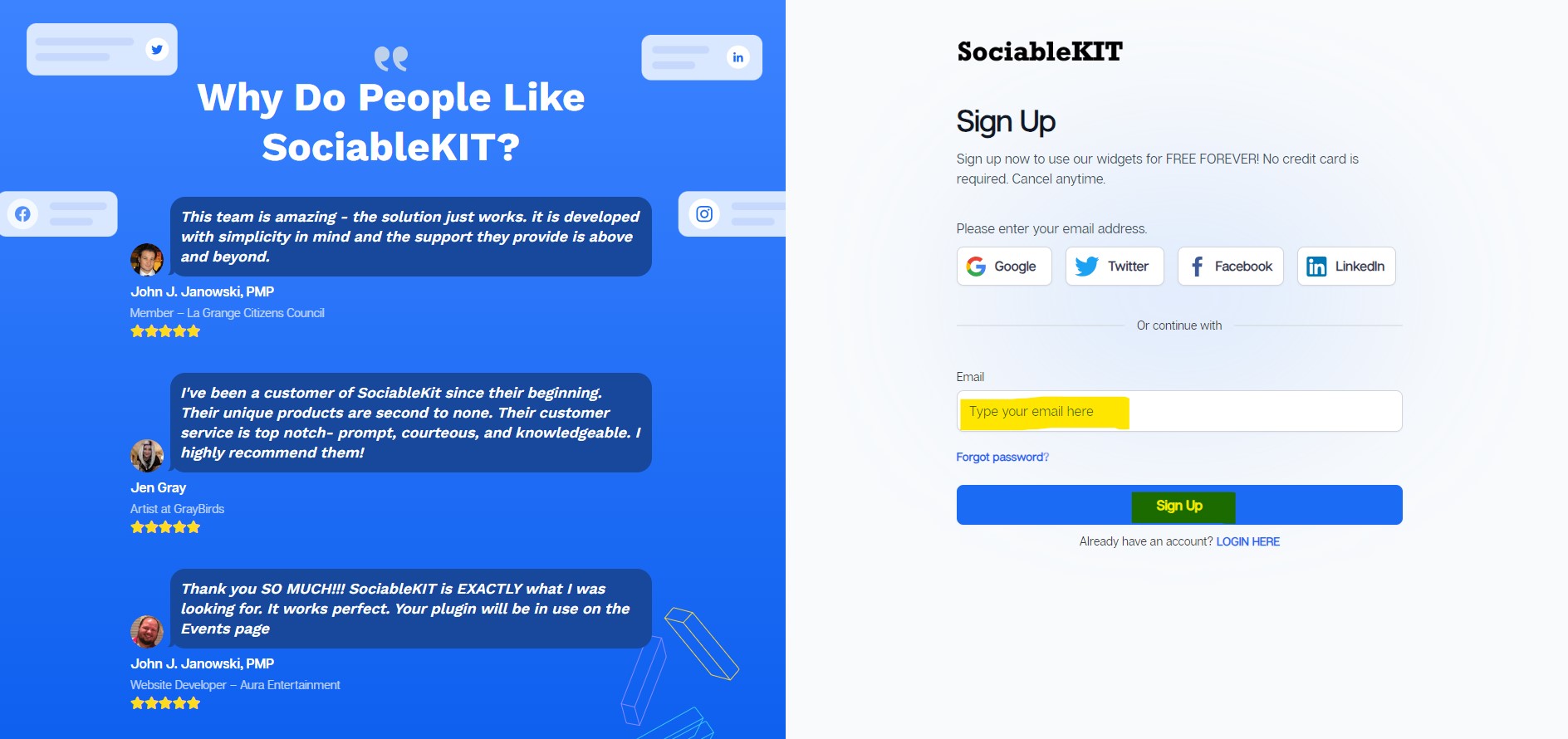
  1. Sign up FREE or login to SociableKIT. You can login here if you already have an account. Once you sign up, you will start your 7-day premium trial. After 7 days, you can activate the free plan if you don't need our premium features. Sign up to SociableKIT - How to embed HomeAdvisor reviews on your Fusion website  for FREE?

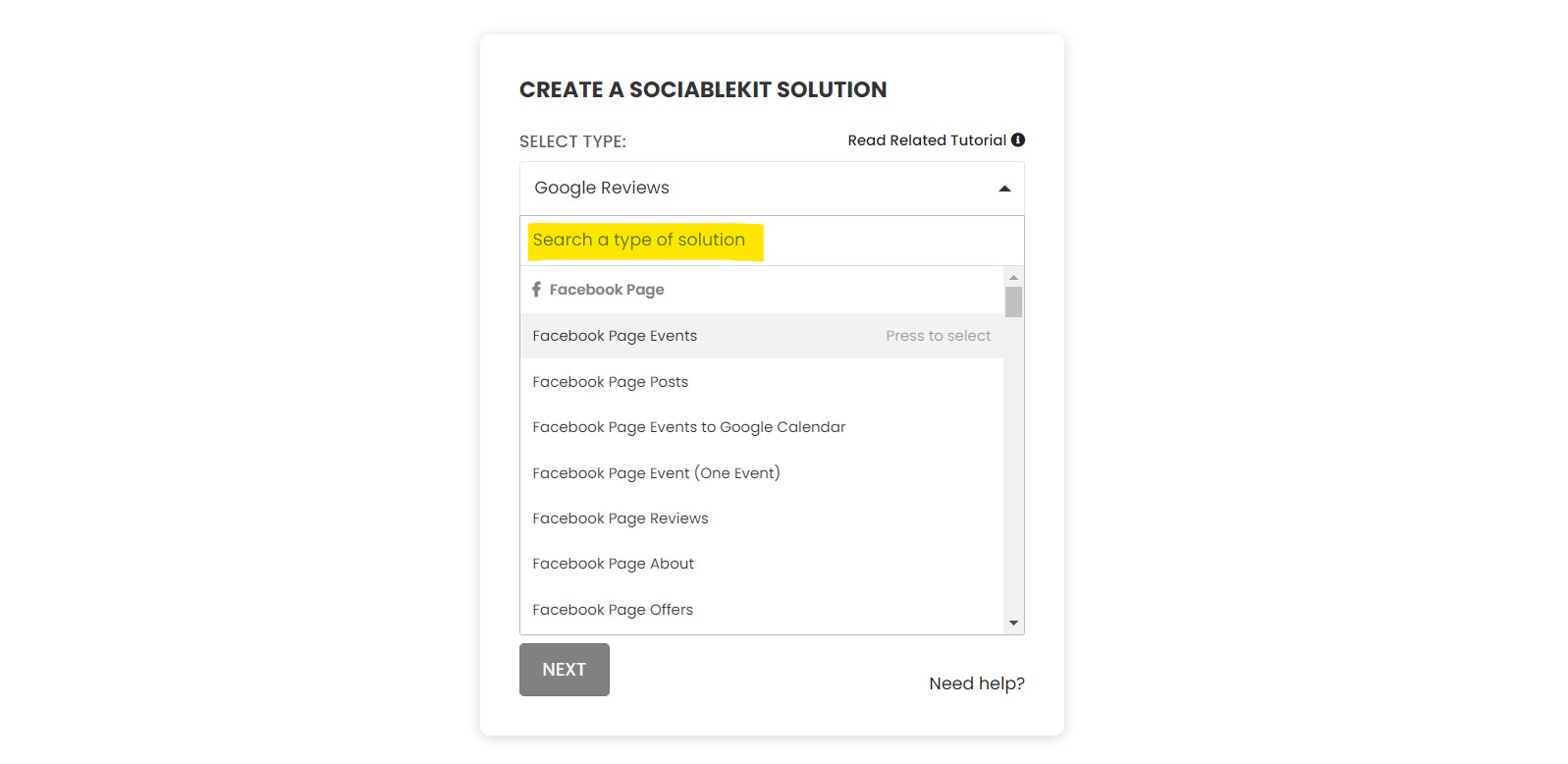
  2. Select "HomeAdvisor reviews" on the dropdown. SociableKIT offers several social media feeds widgets. You might need to search it using the highlighted area below. Once found, you can then select it.Select "HomeAdvisor reviews" on the dropdown - How to embed HomeAdvisor reviews on your Fusion website  for FREE?

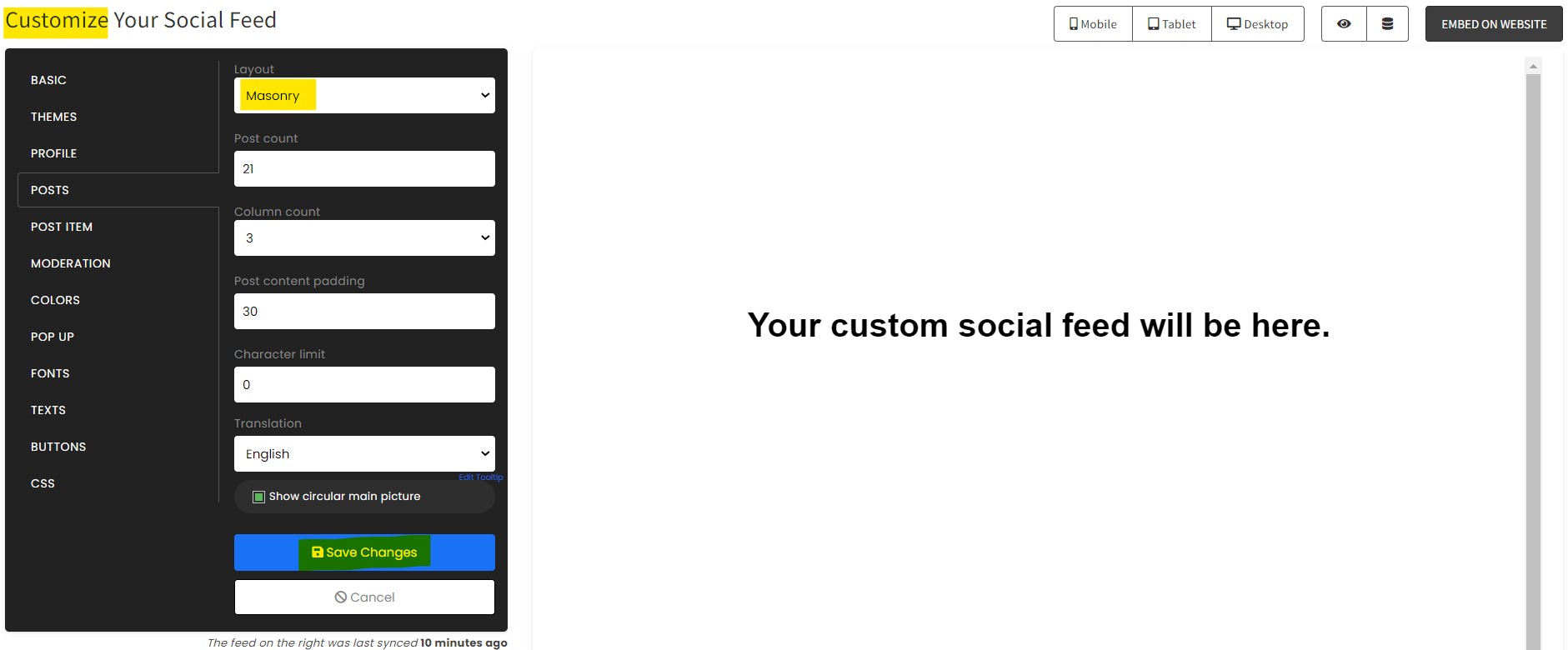
  3. Customize your feed. Click the "NEXT" button to show the customization options of your social feed. You can change the layout, colors, font, and more to match your brand. Click the Save changes button.Customize your feed - How to embed HomeAdvisor reviews on your Fusion website  for FREE?
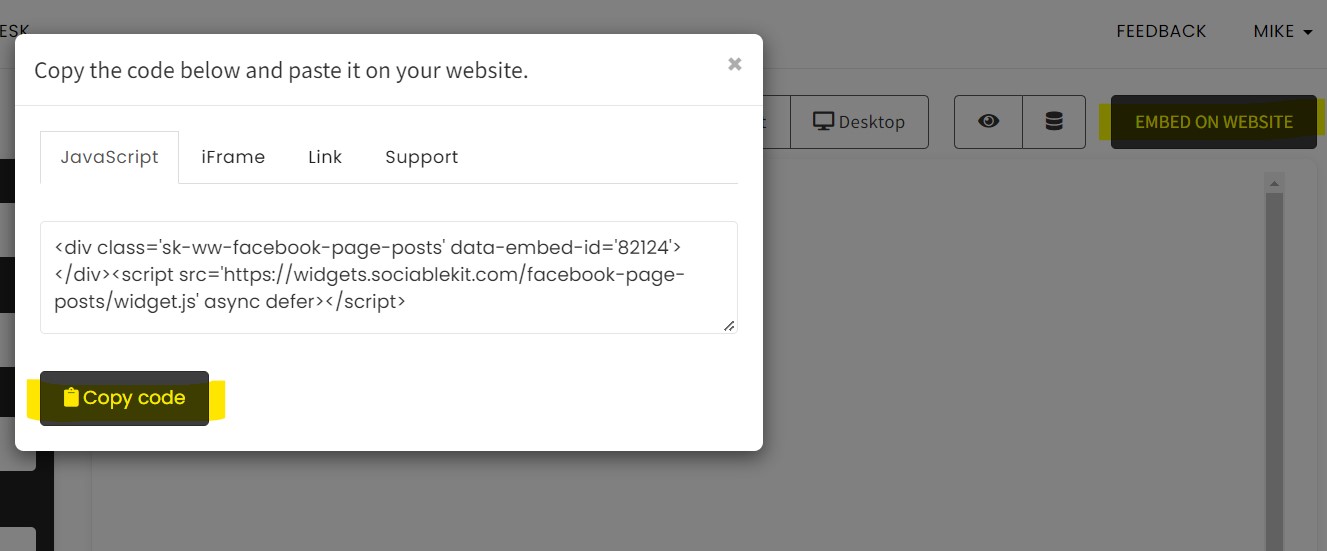
  4. Copy the embed code. Click the "Embed on website" button on the upper right corner. Select your website builder. On the popup, copy the JavaScript embed code.Copy the embed code. - How to embed HomeAdvisor reviews on your Fusion website  for FREE?
  5. Paste the embed code and save your Fusion website page. Please follow the second part below to add HomeAdvisor reviews widget to your Fusion website .

Add HomeAdvisor reviews widget to your Fusion website

The second part is adding your HomeAdvisor reviews widget to your Fusion website . After you customize your HomeAdvisor reviews widget and copied the embed code, it is time to add it to your Fusion website . Follow the steps below.

  1. Copy your free HomeAdvisor reviews widget embed code. Make sure you followed the first part above. It detailed how to you can create and customize your widget to get your free embed code.
  2. Login to your WordPress site. 
  3. On your WordPress, go to the "Pages" section then click the "Add new page".
  4. Add an element by clicking the "+" button.
  5. Click the "Code" button.
  6. Click the "Edit" icon.
  7. Paste the code on the "Code" area, then click the "Close" button to save the changes.
  8. To preview, click the "Preview" button. To publish, click the "Publish" button.
  9. Click the "View page". Done!

Website builders

Paste your embed code on any platform

SociableKIT works with every major website builder. Pick yours below for copy-paste instructions tailored to that platform.

To embed HomeAdvisor reviews on your Fusion site, follow the steps below after you have your SociableKIT embed code.

  1. Sign up free to SociableKIT and create your HomeAdvisor reviews widget.
  2. Customize your widget and copy the embed code from the dashboard.
  3. Login to your WordPress site. 
  4. On your WordPress, go to the "Pages" section then click the "Add new page".
  5. Add an element by clicking the "+" button.
  6. Click the "Code" button.
  7. Click the "Edit" icon.
  8. Paste the code on the "Code" area, then click the "Close" button to save the changes.
  9. To preview, click the "Preview" button. To publish, click the "Publish" button.
  10. Click the "View page". Done!
Full Fusion tutorial →

To embed HomeAdvisor reviews on your WordPress site, follow the steps below after you have your SociableKIT embed code.

  1. Sign up free to SociableKIT and create your HomeAdvisor reviews widget.
  2. Customize your widget and copy the embed code from the dashboard.
  3. Login to your WordPress site. 
  4. On your WordPress, go to the "Pages" section then click the "Add new page".
  5. Pick a pre-defined layout or start with a blank page by clicking the "Blank page" button.
  6. On the body of your page, click the "+" icon and click the "Custom HTML".
  7. Paste the code in the text area and click update.
  8. The widget will appear on the WordPress page.
  9. Click the Publish or Update button on your WordPress page. 
  10. Click the view page. Done!
Full WordPress tutorial →

To embed HomeAdvisor reviews on your Wix site, follow the steps below after you have your SociableKIT embed code.

  1. Sign up free to SociableKIT and create your HomeAdvisor reviews widget.
  2. Customize your widget and copy the embed code from the dashboard.
  3. Login to Wix. 
  4. On your existing website click the "+" button beside the "Main pages" section.
  5. Then click the "Add page" button.
  6. Name your page then hit enter.
  7. On the left, click "Add element". Find and click "Embed code". Click and drag "Embed a site" on your page then resize the container. 
  8. Click "Change website address". 
  9. Paste the link you copied from SociableKIT then click "Apply".
  10. Click "Publish" on the upper right. 
  11. Click "View site". Done!
Full Wix tutorial →

To embed HomeAdvisor reviews on your Squarespace site, follow the steps below after you have your SociableKIT embed code.

  1. Sign up free to SociableKIT and create your HomeAdvisor reviews widget.
  2. Customize your widget and copy the embed code from the dashboard.
  3. Login to Squarespace. You must have a "Business" account in Squarespace to use the widget. The "code block" needed cannot be found if you only have a "Personal" account.
  4. Create a new blank page or edit your existing page. Identify which page you want the widget to appear. You can create a new page on Squarespace, or you can edit your existing page where you want the widget to appear.
  5. Add a Code Block. On your Squarespace page, click the 'Edit' button. Find the 'Code' block and click it.
  6. Paste the embed code from SociableKIT. On the 'Content' of the 'Code' block, paste the JavaScript embed code you have copied from your widget.
  7. Save the changes on the 'Code block'. After pasting your widget's embed code. Click the 'Save' button on the left part of the page.
  8. View your page. Refresh your Squarespace page and check your SociableKIT widget. Done!
Full Squarespace tutorial →

To embed HomeAdvisor reviews on your Webflow site, follow the steps below after you have your SociableKIT embed code.

  1. Sign up free to SociableKIT and create your HomeAdvisor reviews widget.
  2. Customize your widget and copy the embed code from the dashboard.
  3. Login to Webflow. 
  4. On your existing website, click the "Page: ...." in the upper left corner then click the "Create new page" icon.
  5. Once done add a name for your new page then click "Save".
  6. On the left, click "Add Element". Drag "Embed" to your page. 
  7. Paste the JavaScript code you copied from SociableKIT.
  8. On the upper right, click "Publish" > "Publish to Selected Domains". 
  9. View your page. Done!
Full Webflow tutorial →

To embed HomeAdvisor reviews on your Shopify site, follow the steps below after you have your SociableKIT embed code.

  1. Sign up free to SociableKIT and create your HomeAdvisor reviews widget.
  2. Customize your widget and copy the embed code from the dashboard.
  3. Login to Shopify. 
  4. On the left side, click Online Store. 
  5. Click Pages. Add a new page or edit your existing page.
  6. On the Page details, click Show HTML icon (<>). 
  7. Paste the embed code and click the Save button.
  8. Click the View page button. Done!
Full Shopify tutorial →

To embed HomeAdvisor reviews on your HTML site, follow the steps below after you have your SociableKIT embed code.

  1. Sign up free to SociableKIT and create your HomeAdvisor reviews widget.
  2. Customize your widget and copy the embed code from the dashboard.
  3. Open your HTML file.
  4. You can create a new HTML page or edit your existing HTML page.
  5. Paste the Javascript code you copied from SociableKIT. Paste it where you want the widget to appear.
  6. Save your HTML page.
  7. You may now upload your HTML page to your web hosting.
Full HTML tutorial →

To embed HomeAdvisor reviews on your Google Sites site, follow the steps below after you have your SociableKIT embed code.

  1. Sign up free to SociableKIT and create your HomeAdvisor reviews widget.
  2. Customize your widget and copy the embed code from the dashboard.
  3. Login to Google sites. You must have at least a 'Business Starter' plan to create and customize your Google sites.
  4. Create or edit an existing website. Click the + 'Blank' button on the 'Start a new site' section to create or find your existing website under the 'Recent sites' section.
  5. Create a new blank page or edit your existing page. Identify which page you want the widget to appear. On the right sidebar, you will see an 'Embed' button. Click the 'Embed' button. 
  6. Add the widget. A popup 'Embed from the web' will open up. Select the 'Embed code' tab on the popup. 
  7. Paste the embed code from SociableKIT. On the 'Embed code' tab, you will see 'HTML code goes here' text. Paste the embed code from your SociableKIT widget.
  8. Save the widget. Once you have pasted your embed code, click the 'Next' button. 
  9. Preview of your SociableKIT widget. After clicking the Next button, a preview of your embed code will be displayed. Click the 'Insert' button to insert the widget to your Google sites page. 
  10. Edit the widget. Once the widget has been inserted, you will have the option to resize the widget. After resizing the widget to your preferences, click the 'Publish' button on the upper right corner of the page. 
  11. Publish your page. After publishing the site, click the down 'Arrow' button beside the 'Publish' button. 
  12. View your page. A dropdown of buttons will be displayed, click the 'View published site' button. Done!
Full Google Sites tutorial →

Live preview

Pick a HomeAdvisor reviews template — see it live

Choose a starting design on the left and watch the preview update with real data. What you see is exactly what visitors get on your Fusion website.

Widget previewMasonry
Live data

Select a template to start with

Continue with this template

Common questions

Frequently asked questions

Everything you need to know about embedding HomeAdvisor reviews on your Fusion website.

What is a HomeAdvisor Reviews widget?

A HomeAdvisor Reviews widget displays public customer feedback from your HomeAdvisor business profile directly on your website. It gives homeowners useful social proof while they are deciding whether to request an estimate, call, or hire your business.

How do I add HomeAdvisor reviews to my website without coding?

Create a HomeAdvisor Reviews widget in SociableKIT, connect your source, customize the design, and copy the generated embed code. Paste the code into an HTML, custom code, or embed block on your website.

What do I need to connect my HomeAdvisor reviews?

You need a public HomeAdvisor business profile that SociableKIT can use as the review source. Check that the profile shows the correct business name, service area, rating, and reviews before completing the setup.

Does my HomeAdvisor profile need to be public?

Yes, the profile and reviews must be publicly available for reliable website display. Private, removed, restricted, or unavailable content cannot be collected by SociableKIT.

Will new HomeAdvisor reviews appear automatically?

Yes, paid SociableKIT plans include automatic syncing, so you can keep the same embed code as new eligible reviews are published. The free plan lets you request a sync when you want to refresh the widget.

How quickly will a new HomeAdvisor review appear on my website?

A review must first be published and publicly available on HomeAdvisor. After that, it can appear following the next SociableKIT sync for your plan, so updates may not be instant.

What information can the HomeAdvisor Reviews widget display?

The widget can show available details such as the reviewer name, star rating, review date, review text, overall rating, and total review count. The exact information depends on what HomeAdvisor makes publicly available for the connected profile.

Can I choose which HomeAdvisor reviews appear?

SociableKIT provides moderation controls for supported review setups, helping you keep the display relevant to each page. Business plans also include automatic moderation for supported content.

Can I show only five-star HomeAdvisor reviews?

You can curate the reviews shown when the available moderation settings support that choice. Showing a useful mix of recent and detailed feedback can also make the widget feel more natural and credible.

Can I edit the wording or rating of a HomeAdvisor review?

No, SociableKIT displays reviews from the public source and does not rewrite the customer's words or change the star rating. This preserves the original feedback and helps visitors recognize it as genuine social proof.

Does the widget collect new reviews from customers?

The HomeAdvisor Reviews widget is mainly designed to display reviews that already exist on your public profile. You can use a clear call to action to guide customers toward the original review process, which remains controlled by HomeAdvisor.

Can business responses to reviews appear in the widget?

A public business response may appear when HomeAdvisor includes it in the review data available to SociableKIT. Manage or update the response on the original profile because the widget does not create or edit replies.

What happens if my HomeAdvisor profile address changes or stops working?

The widget depends on a working public source, so a changed, redirected, or removed profile can interrupt updates. Update the source in SociableKIT or contact support to help reconnect the correct business profile.

Can I display reviews from multiple contractors or business locations?

Yes, you can add each HomeAdvisor business profile as a separate source and create a widget for every contractor, branch, or service area. Choose a SociableKIT plan with enough sources for the profiles you want to connect.

Can I combine HomeAdvisor reviews with reviews from other platforms?

Yes, SociableKIT offers a Reviews Widget that can bring supported review sources together in one display. This is useful when customers leave feedback in several places and you want one consistent review section.

Can I reuse the same reviews on multiple pages or websites?

Yes, paid SociableKIT plans include unlimited widgets, websites, and domains. You can reuse one review source in different layouts for your homepage, service pages, location pages, or estimate-request page.

Which website builders support the HomeAdvisor Reviews widget?

SociableKIT works with WordPress, Shopify, Wix, Squarespace, Webflow, Weebly, Google Sites, SharePoint, and standard HTML websites. It also works with other platforms that accept an HTML, custom code, iframe, or embed element.

Is the HomeAdvisor Reviews widget responsive and customizable?

Yes, the widget adjusts to desktop, tablet, and mobile screens and can be styled with your colors, fonts, spacing, layout, and calls to action. SociableKIT also provides masonry, grid, and carousel templates so you can launch quickly.

Will the widget slow down my website or improve SEO?

Any external widget adds some page resources, so performance depends on the page, website builder, and amount of content displayed. Reviews can improve trust and engagement, but they do not guarantee higher rankings, so keep adding original service and location content around the widget.

Is there a free plan, unlimited views, and customer support?

SociableKIT offers a free plan with one source, one widget, 2,000 monthly views, design customization, branding, and sync requests. Paid plans add automatic syncing and unlimited views, with human chat and email support available 24/7 on paid plans.

Add your HomeAdvisor reviews widget today

Set up in minutes. Free forever to start.

Create your widget

Free forever · No credit card · Cancel anytime

Just need a free widget? See our free plan → View HomeAdvisor reviews widget page →
More widgets

Show off everything your customers love.

HomeAdvisor reviews is just the start. Embed reviews and content from anywhere your customers talk about you.

Social Feed

Social Feed

Pull in your social posts and recommendations.

Learn more →
Reviews Widget

Reviews Widget

Show your latest reviews directly on your site.

Learn more →
Google Reviews

Google Reviews

Display your Google business reviews and ratings.

Learn more →
LinkedIn Feed

LinkedIn Feed

Share your professional updates and articles.

Learn more →
Instagram Feed

Instagram Feed

Show your latest Instagram posts directly on your site.

Learn more →
YouTube Channel

YouTube Channel

Embed your latest YouTube videos in a clean feed.

Learn more →
Facebook Feed

Facebook Feed

Pull in your Facebook page reviews and posts.

Learn more →
TikTok Feed

TikTok Feed

Showcase your TikTok content on your website.

Learn more →
X Feed

X Feed

Display your latest posts from X on your site.

Learn more →
Facebook Events

Facebook Events

Perfect for promoting upcoming events and meetups.

Learn more →
Indeed Jobs

Indeed Jobs

Show job listings from Indeed on your website.

Learn more →
YouTube Playlist

YouTube Playlist

Embed a curated YouTube playlist on your site.

Learn more →

100+ more widgets

Browse the full catalog of widgets for your website.

See all →
SociableKIT

SociableKIT turns your social feeds, reviews, and customer content into 24/7 social proof — automatically building trust on your website while you sleep. Trusted by 400,000+ websites worldwide.

Kristen Williams Marc Maessen John Janowski Jules Webb
Rated 4.9/5 from 620+ Reviews
  • twitter
  • fb
  • linkedin
  • youtube
  • instagram
Tour
  • Home
  • Widgets
  • Pricing
  • Blog
  • Tutorials
  • Demos
Company
  • About us
  • Reviews
  • Social
  • Customers
  • Support
  • Webynize
Resources
  • Tutorials
  • Free Widgets
  • Examples
  • Developers
  • Generators
  • Export
  • All resources
Policies
  • Terms of Service
  • Privacy Policy
  • Acceptable Use

All rights reserved © 2014 - 2026 / Sitemap