
Your AliExpress reviews on HubSpot website — live in 3 steps
SociableKIT syncs your aliexpress reviews automatically. Set up once, embed anywhere — free to start, no coding required.
-
Create in 60 seconds
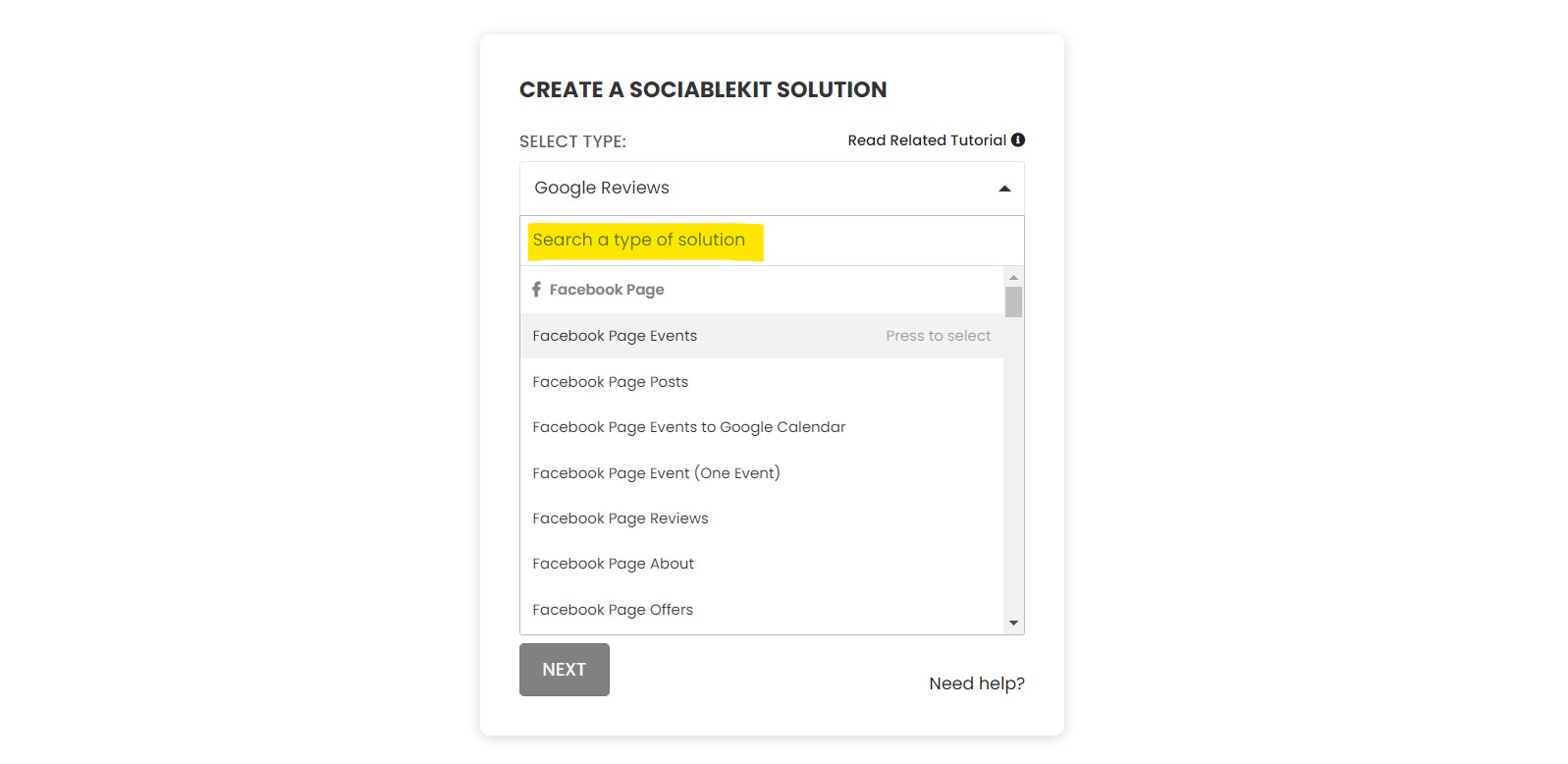
Pick AliExpress reviews in the dashboard and connect your source.
-
Match your brand
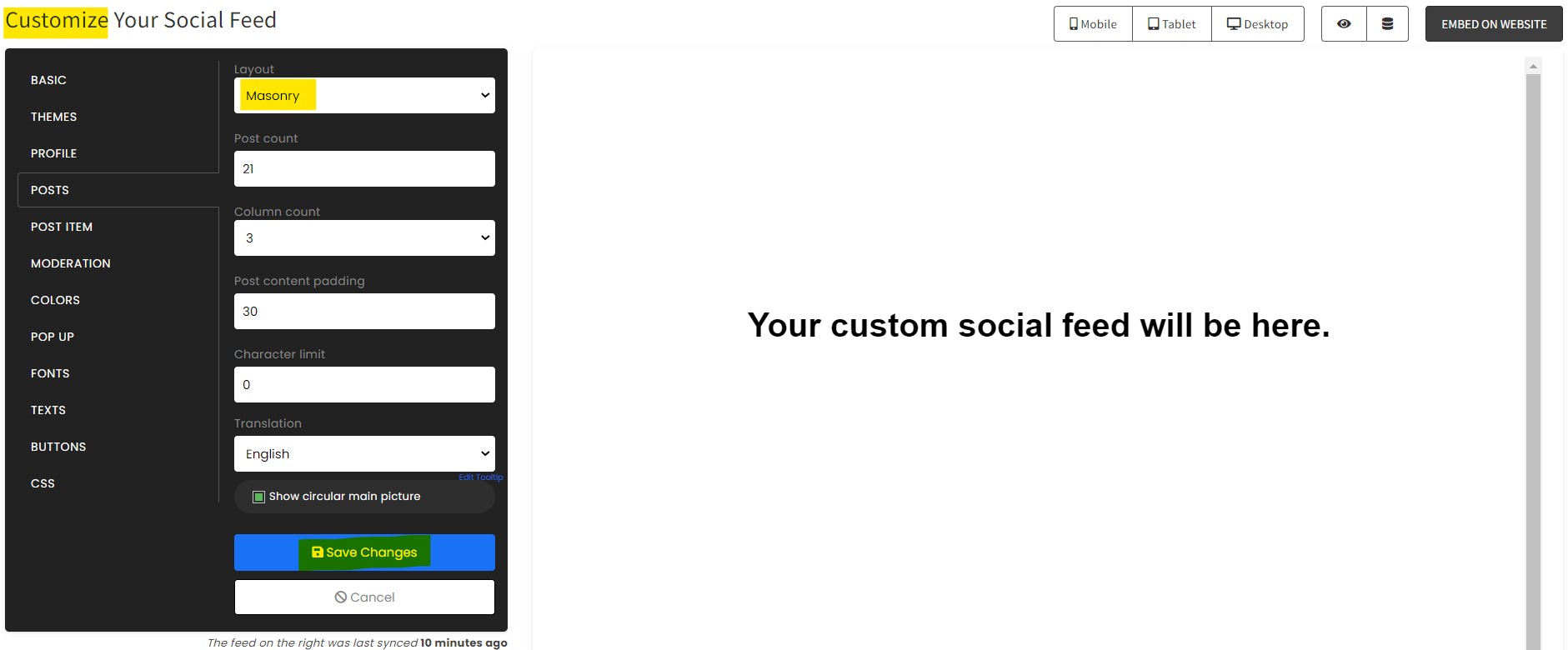
Colors, fonts, layout — tune it until it feels native to your site.
-
Paste one line of code
Drop the embed snippet on your HubSpot website. No dev team needed.
Embed AliExpress reviews with SociableKIT — step by step
Create your widget in the dashboard, copy the embed code, and paste it on your HubSpot website. Screenshots included so you never get stuck.
Create and customize your AliExpress reviews widget
The first part is creating your AliExpress reviews widget using the SociableKIT dashboard. Customize the look and feel to match your brand. Follow the steps below.
-
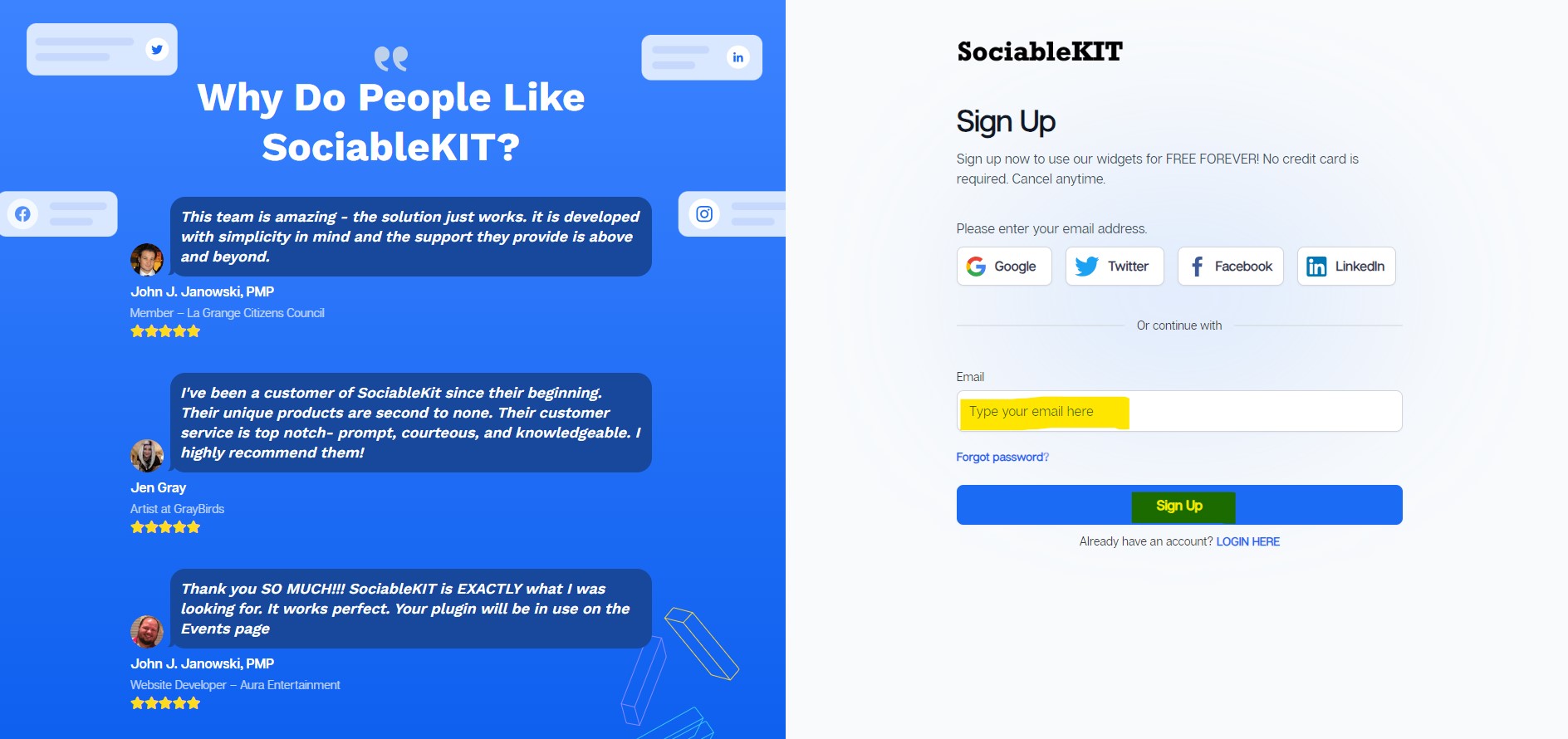
Sign up FREE or login to SociableKIT. You can login here if you already have an account. Once you sign up, you will start your 7-day premium trial. After 7 days, you can activate the free plan if you don't need our premium features.

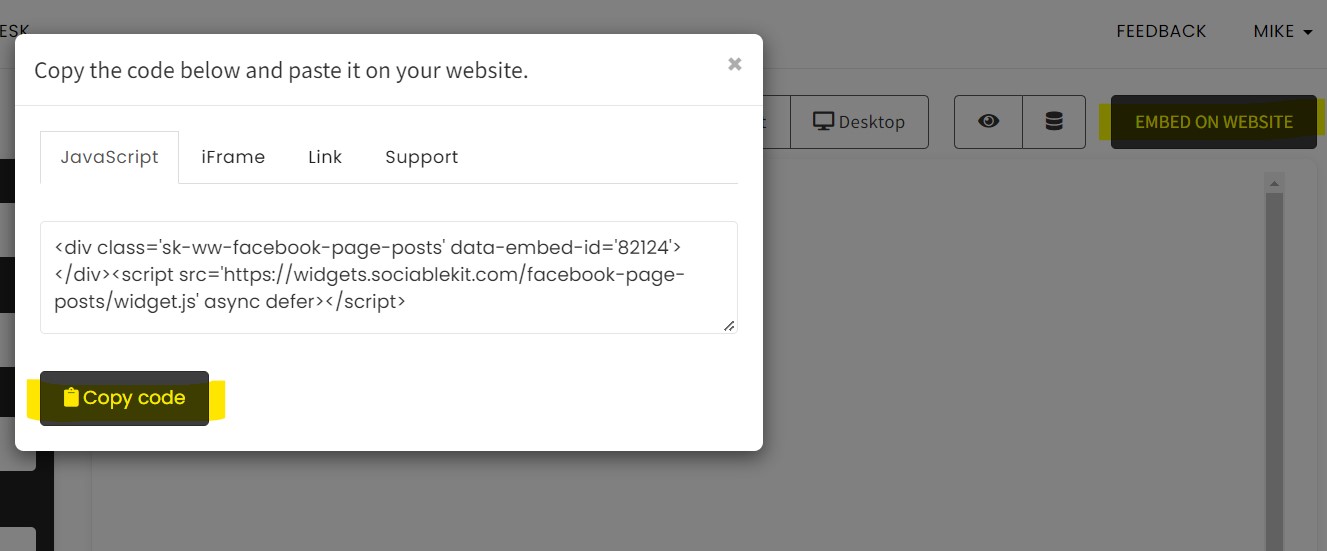
- Paste the embed code and save your HubSpot website page. Please follow the second part below to add AliExpress reviews widget to your HubSpot website .
Add AliExpress reviews widget to your HubSpot website
The second part is adding your AliExpress reviews widget to your HubSpot website . After you customize your AliExpress reviews widget and copied the embed code, it is time to add it to your HubSpot website . Follow the steps below.
- Copy your free AliExpress reviews widget embed code. Make sure you followed the first part above. It detailed how to you can create and customize your widget to get your free embed code.
- Login or register an account to Hubspot.
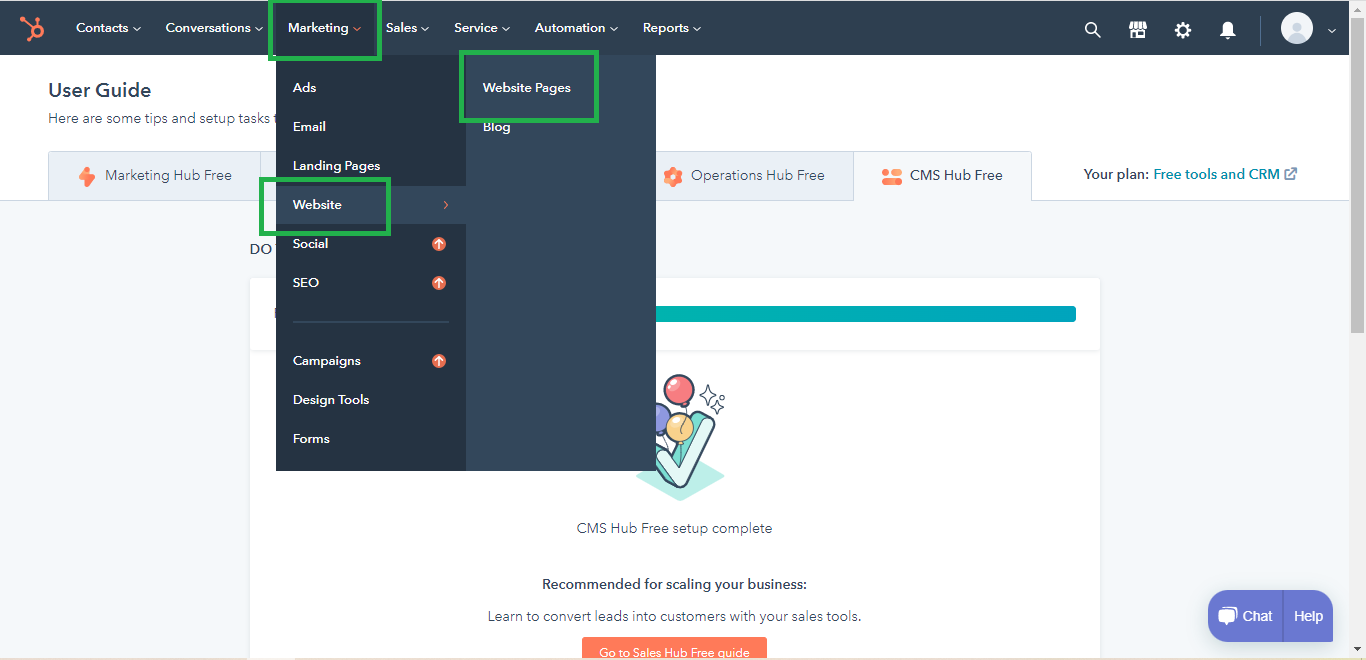
- Go to create a website dashboard. Go to "Marketing" tab "Website" tab then click the "Website pages".
![]()
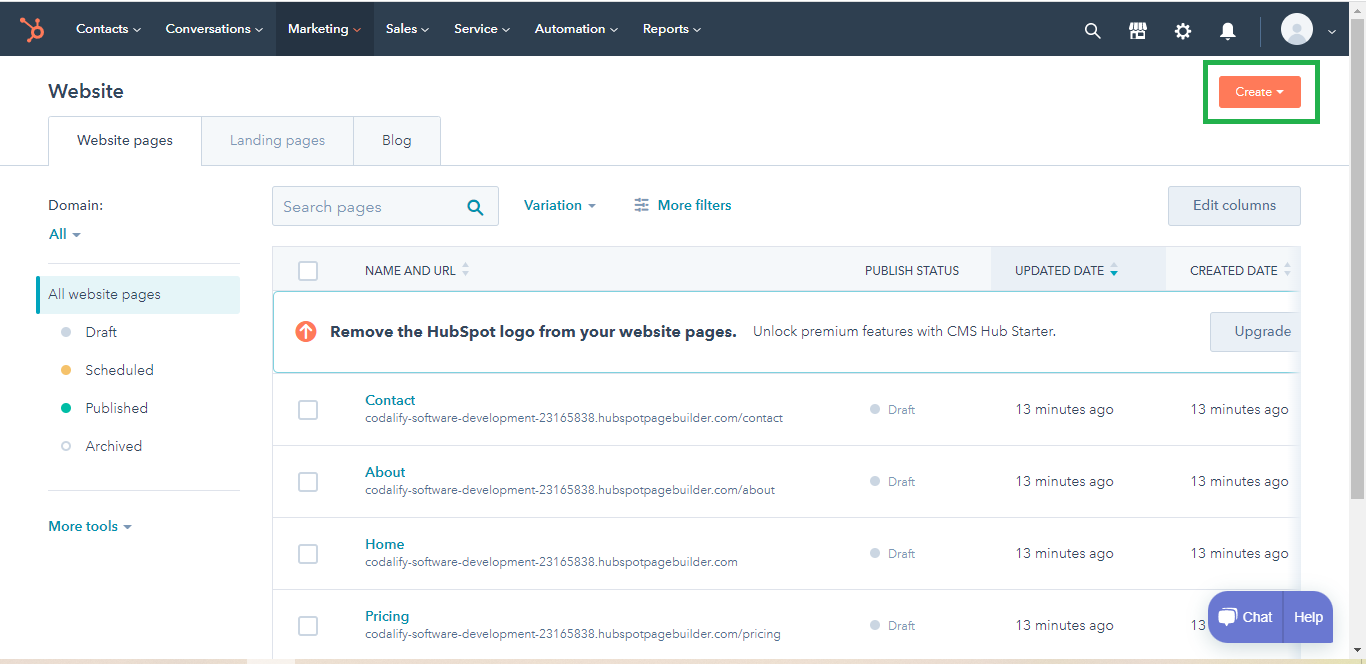
- Create or edit a website. Click the "Create" button or edit an existing website to continue. This is where you want to display your widget.
![]()
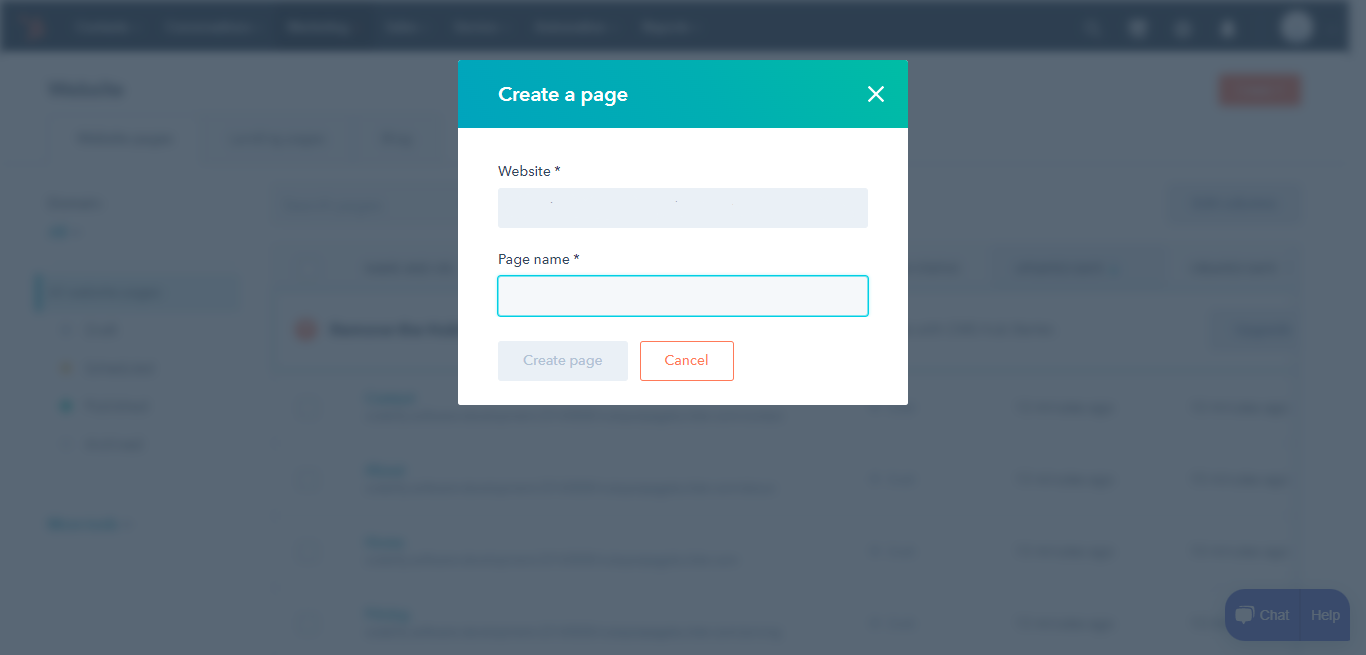
- Create a page. Fill up the information needed for creating a webpage.
![]()
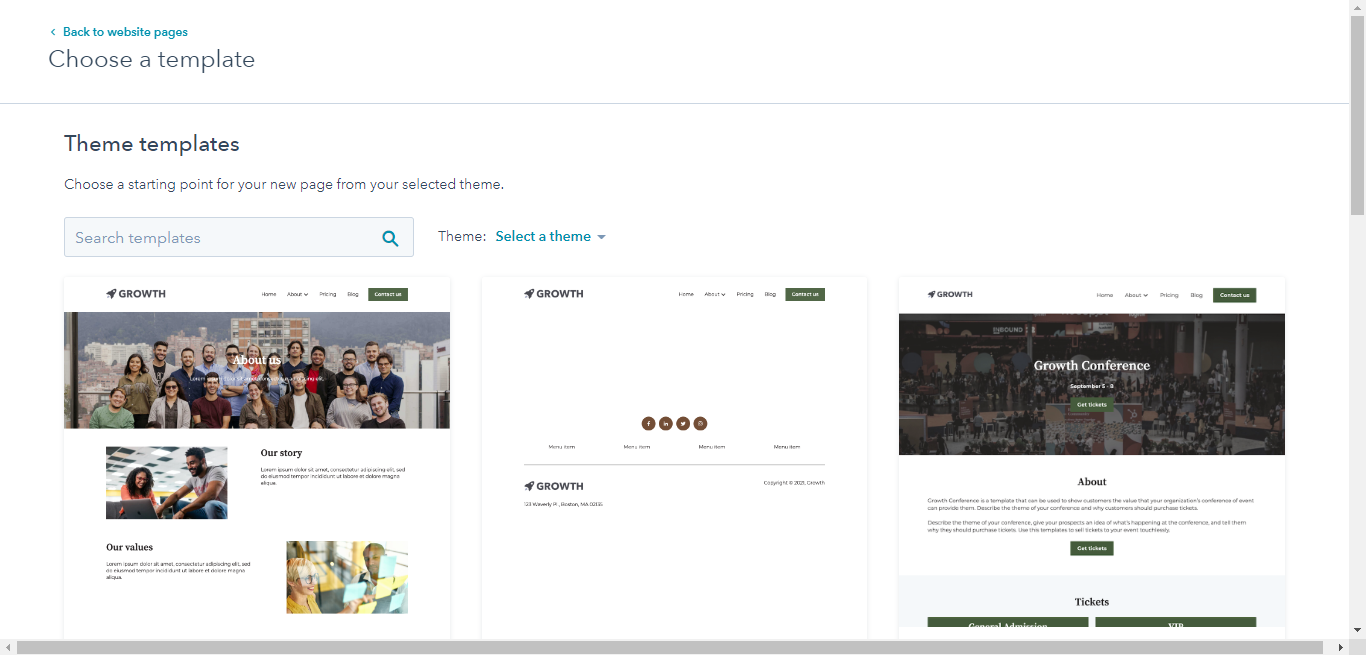
- Select your desired template.
![]()
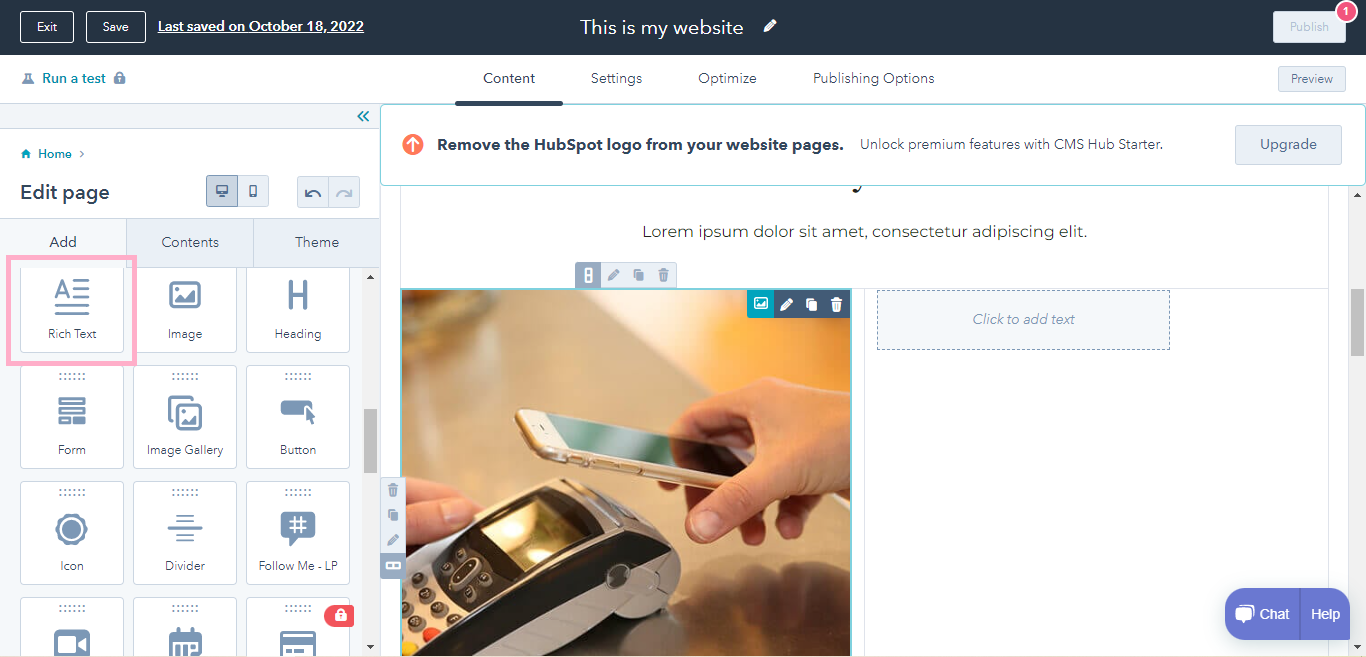
- Add rich text editor to your webpage. Drag and drop the rich text editor on wherever you wanted to display your widget.
![]()
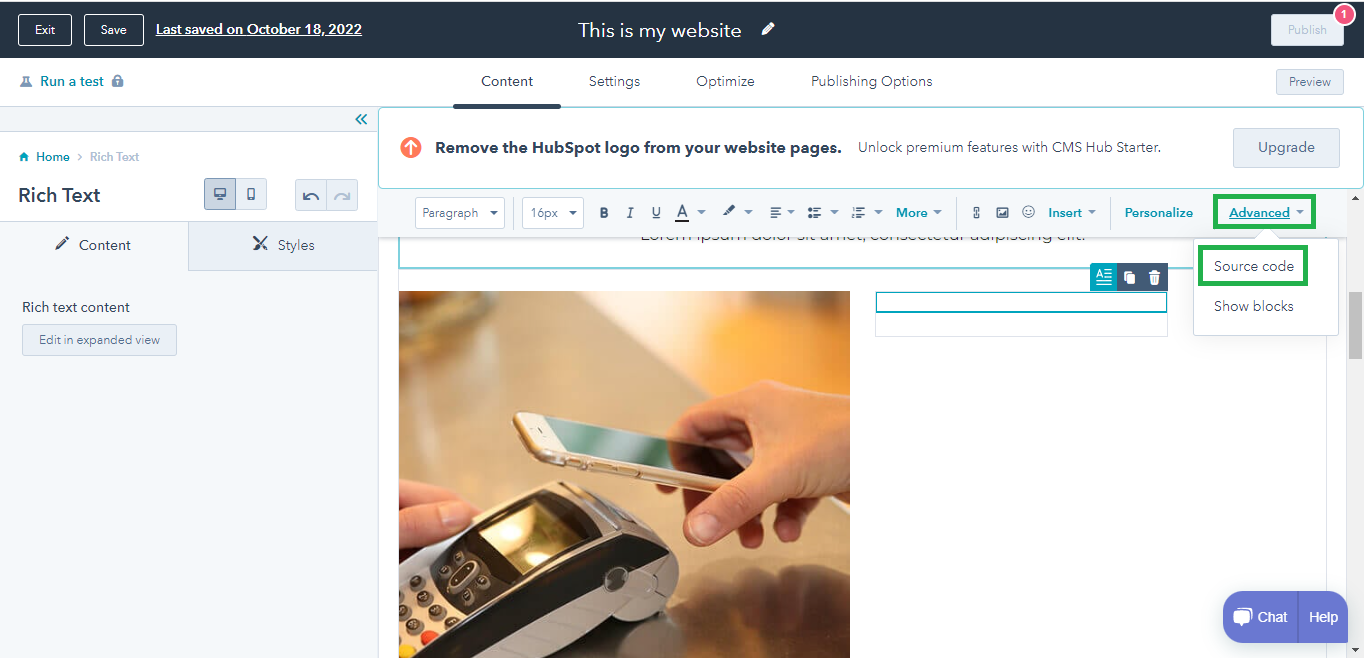
- Add source code. Click the "Advanced" dropdown then choose "Source code".
![]()
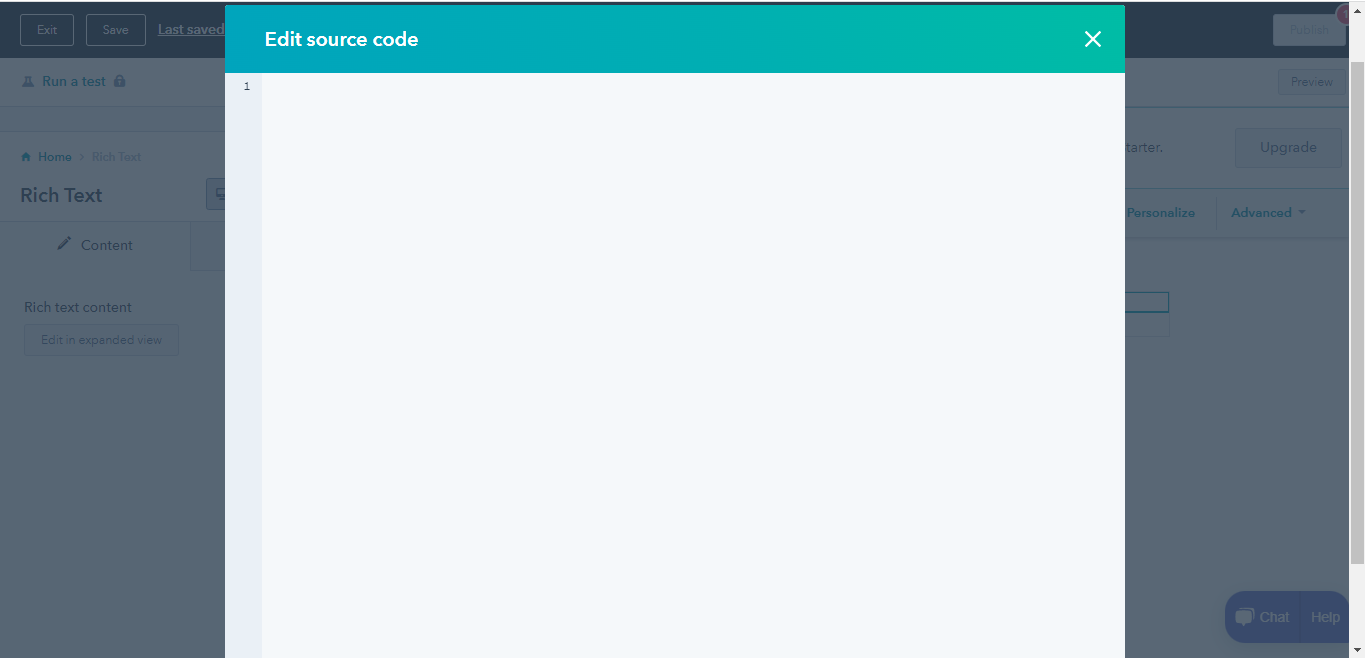
- Paste the Javascript code you copied from SociableKIT. Once the done scroll down to bottom part then click "Save changes".
![]()
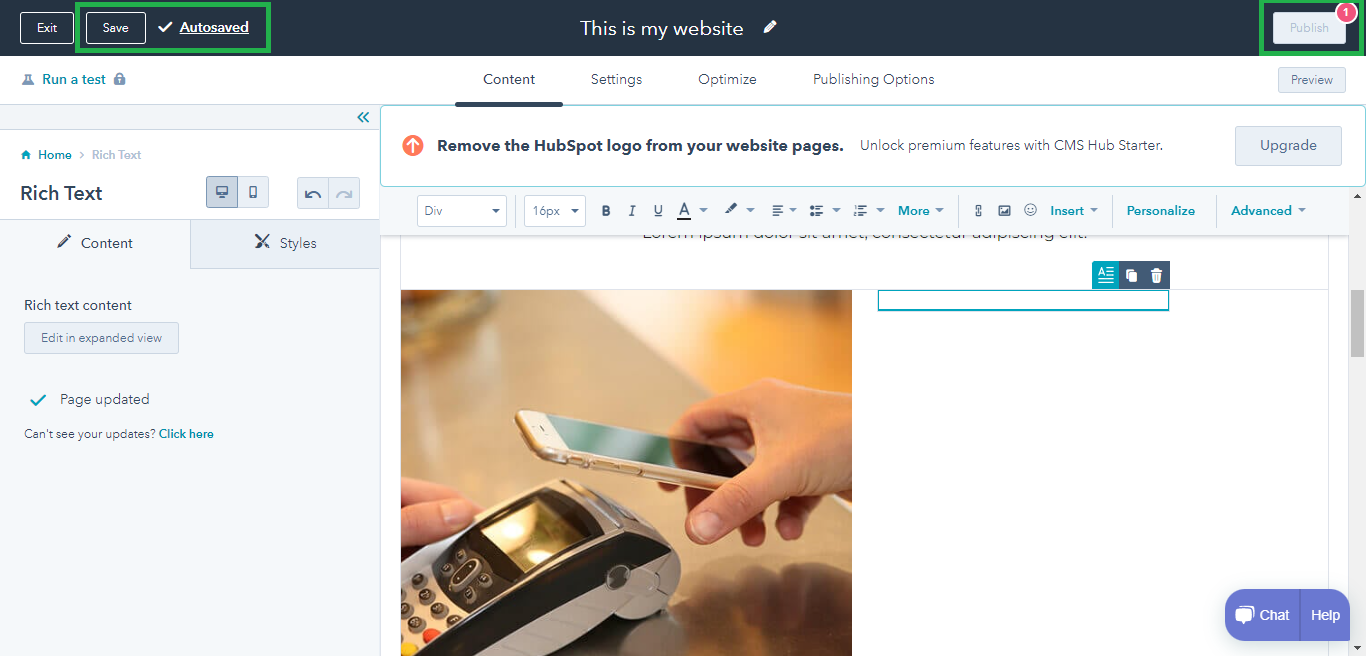
- Save and publish your page. Click Save if needed, although HubSpot also saves your changes automatically. Then click Publish to view your page in a web browser. Done!
![]()
Website builders
Paste your embed code on any platform
SociableKIT works with every major website builder. Pick yours below for copy-paste instructions tailored to that platform.
To embed AliExpress reviews on your HubSpot site, follow the steps below after you have your SociableKIT embed code.
- Sign up free to SociableKIT and create your AliExpress reviews widget.
- Customize your widget and copy the embed code from the dashboard.
- Login or register an account to Hubspot.
- Go to create a website dashboard. Go to "Marketing" tab "Website" tab then click the "Website pages".
![]()
- Create or edit a website. Click the "Create" button or edit an existing website to continue. This is where you want to display your widget.
![]()
- Create a page. Fill up the information needed for creating a webpage.
![]()
- Select your desired template.
![]()
- Add rich text editor to your webpage. Drag and drop the rich text editor on wherever you wanted to display your widget.
![]()
- Add source code. Click the "Advanced" dropdown then choose "Source code".
![]()
- Paste the Javascript code you copied from SociableKIT. Once the done scroll down to bottom part then click "Save changes".
![]()
- Save and publish your page. Click Save if needed, although HubSpot also saves your changes automatically. Then click Publish to view your page in a web browser. Done!
![]()
To embed AliExpress reviews on your WordPress site, follow the steps below after you have your SociableKIT embed code.
- Sign up free to SociableKIT and create your AliExpress reviews widget.
- Customize your widget and copy the embed code from the dashboard.
- Login to your WordPress site.
![]()
- On your WordPress, go to the "Pages" section then click the "Add new page".
![]()
- Pick a pre-defined layout or start with a blank page by clicking the "Blank page" button.
![]()
- On the body of your page, click the "+" icon and click the "Custom HTML".
![]()
- Paste the code in the text area and click update.
![]()
- The widget will appear on the WordPress page.
![]()
- Click the Publish or Update button on your WordPress page.
![]()
- Click the view page. Done!
To embed AliExpress reviews on your Wix site, follow the steps below after you have your SociableKIT embed code.
- Sign up free to SociableKIT and create your AliExpress reviews widget.
- Customize your widget and copy the embed code from the dashboard.
- Login to Wix.
![]()
- On your existing website click the "+" button beside the "Main pages" section.
![]()
- Then click the "Add page" button.
![]()
- Name your page then hit enter.
![]()
- On the left, click "Add element". Find and click "Embed code". Click and drag "Embed a site" on your page then resize the container.
![]()
- Click "Change website address".
![]()
- Paste the link you copied from SociableKIT then click "Apply".
![]()
- Click "Publish" on the upper right.
![]()
- Click "View site". Done!
![]()
To embed AliExpress reviews on your Squarespace site, follow the steps below after you have your SociableKIT embed code.
- Sign up free to SociableKIT and create your AliExpress reviews widget.
- Customize your widget and copy the embed code from the dashboard.
- Login to Squarespace. You must have a "Business" account in Squarespace to use the widget. The "code block" needed cannot be found if you only have a "Personal" account.
![]()
- Create a new blank page or edit your existing page. Identify which page you want the widget to appear. You can create a new page on Squarespace, or you can edit your existing page where you want the widget to appear.
![]()
- Add a Code Block. On your Squarespace page, click the 'Edit' button. Find the 'Code' block and click it.
![]()
- Paste the embed code from SociableKIT. On the 'Content' of the 'Code' block, paste the JavaScript embed code you have copied from your widget.
![]()
- Save the changes on the 'Code block'. After pasting your widget's embed code. Click the 'Save' button on the left part of the page.
![]()
- View your page. Refresh your Squarespace page and check your SociableKIT widget. Done!
![]()
To embed AliExpress reviews on your Webflow site, follow the steps below after you have your SociableKIT embed code.
- Sign up free to SociableKIT and create your AliExpress reviews widget.
- Customize your widget and copy the embed code from the dashboard.
- Login to Webflow.
![]()
- On your existing website, click the "Page: ...." in the upper left corner then click the "Create new page" icon.
![]()
- Once done add a name for your new page then click "Save".
![]()
- On the left, click "Add Element". Drag "Embed" to your page.
![]()
- Paste the JavaScript code you copied from SociableKIT.
![]()
- On the upper right, click "Publish" > "Publish to Selected Domains".
![]()
- View your page. Done!
To embed AliExpress reviews on your Shopify site, follow the steps below after you have your SociableKIT embed code.
- Sign up free to SociableKIT and create your AliExpress reviews widget.
- Customize your widget and copy the embed code from the dashboard.
- Login to Shopify.
![]()
- On the left side, click Online Store.
![]()
- Click Pages. Add a new page or edit your existing page.
![]()
- On the Page details, click Show HTML icon (<>).
![]()
- Paste the embed code and click the Save button.
![]()
- Click the View page button. Done!
![]()
To embed AliExpress reviews on your HTML site, follow the steps below after you have your SociableKIT embed code.
- Sign up free to SociableKIT and create your AliExpress reviews widget.
- Customize your widget and copy the embed code from the dashboard.
- Open your HTML file.
![]()
- You can create a new HTML page or edit your existing HTML page.
![]()
- Paste the Javascript code you copied from SociableKIT. Paste it where you want the widget to appear.
![]()
- Save your HTML page.
![]()
- You may now upload your HTML page to your web hosting.
To embed AliExpress reviews on your Google Sites site, follow the steps below after you have your SociableKIT embed code.
- Sign up free to SociableKIT and create your AliExpress reviews widget.
- Customize your widget and copy the embed code from the dashboard.
- Login to Google sites. You must have at least a 'Business Starter' plan to create and customize your Google sites.
![]()
- Create or edit an existing website. Click the + 'Blank' button on the 'Start a new site' section to create or find your existing website under the 'Recent sites' section.
![]()
- Create a new blank page or edit your existing page. Identify which page you want the widget to appear. On the right sidebar, you will see an 'Embed' button. Click the 'Embed' button.
![]()
- Add the widget. A popup 'Embed from the web' will open up. Select the 'Embed code' tab on the popup.
![]()
- Paste the embed code from SociableKIT. On the 'Embed code' tab, you will see 'HTML code goes here' text. Paste the embed code from your SociableKIT widget.
![]()
- Save the widget. Once you have pasted your embed code, click the 'Next' button.
![]()
- Preview of your SociableKIT widget. After clicking the Next button, a preview of your embed code will be displayed. Click the 'Insert' button to insert the widget to your Google sites page.
![]()
- Edit the widget. Once the widget has been inserted, you will have the option to resize the widget. After resizing the widget to your preferences, click the 'Publish' button on the upper right corner of the page.
![]()
- Publish your page. After publishing the site, click the down 'Arrow' button beside the 'Publish' button.
![]()
- View your page. A dropdown of buttons will be displayed, click the 'View published site' button. Done!
![]()
Live preview
Pick a AliExpress reviews template — see it live
Choose a starting design on the left and watch the preview update with real data. What you see is exactly what visitors get on your HubSpot website.
Common questions
Frequently asked questions
Everything you need to know about embedding AliExpress reviews on your HubSpot website.
What is an AliExpress Reviews widget?
An AliExpress Reviews widget displays public buyer feedback from a specific AliExpress product directly on your website. It brings ratings and real customer experiences closer to the product details and purchase action, helping shoppers make a more informed decision.
How do I add AliExpress reviews to my website without coding?
Create the widget in SociableKIT, enter the AliExpress Product ID, customize the design, and copy the generated embed code. Paste that code into an HTML, custom code, or embed block on your website.
Where can I find the AliExpress Product ID?
Open the correct AliExpress product page and find the unique number in its address. Enter that Product ID into SociableKIT and double-check the product title and images before creating the widget.
Do I need an AliExpress seller account, developer account, or API key?
No custom API development is required for the standard SociableKIT setup. You only need the public product source requested by the widget, while SociableKIT manages the technical connection and website embed.
Will new AliExpress reviews appear automatically?
Yes, paid SociableKIT plans include automatic syncing, so you can keep the same embed code as eligible public reviews change. The free plan lets you request a sync when you want to refresh the widget.
How quickly will a new AliExpress review appear on my website?
The review must first become publicly available on the AliExpress product page. It can then appear after the next available SociableKIT sync, so updates may not be immediate.
What information can the AliExpress Reviews widget display?
The widget can present available details such as the buyer name or public label, star rating, review date, review text, overall rating, and total review count. The exact fields depend on what AliExpress makes publicly available and which SociableKIT display settings are enabled.
Can buyer photos from AliExpress reviews appear in the widget?
Buyer-uploaded photos may appear when AliExpress makes them publicly available and the current widget display supports that media. Availability can vary by review, product, region, and source data.
Will the reviews match the correct AliExpress product and variant?
SociableKIT connects the widget to the AliExpress Product ID you provide, so choosing the correct product source is essential. Variant names and variant-specific review details depend on the information AliExpress includes in the public review data.
Can I display reviews from more than one AliExpress product?
Yes, you can connect additional AliExpress products as separate sources and create a widget for each one. Choose a SociableKIT plan with enough sources for the number of products you want to feature.
Can I choose, hide, or filter which AliExpress reviews appear?
SociableKIT provides moderation options for supported review displays, helping you keep the website section relevant to the product and audience. Business plans also include automatic moderation for supported content.
Can I show only five-star AliExpress reviews?
Where the available rating filters or moderation controls support it, you can feature your strongest reviews. A thoughtful mix of recent and detailed feedback can also feel more credible than a display that looks overly edited.
Can I edit, rewrite, or change the rating of an AliExpress review?
No, SociableKIT should display the buyer's feedback and rating as provided by the public source. Preserving the original content protects its authenticity and avoids turning real reviews into edited testimonials.
Does the widget import AliExpress reviews into my store database?
The SociableKIT widget displays reviews through an embedded section on your website. It does not create native product-review records inside your ecommerce platform or move the reviews into your store's database.
Can customers submit a new AliExpress review through the widget?
The widget is designed to display reviews that already exist on the public AliExpress product page. AliExpress controls who can leave feedback and the purchase-based review process, so the website widget does not create a separate AliExpress review.
What happens if the AliExpress product is removed or the listing changes?
The widget depends on the Product ID and public source remaining available. If the seller removes, replaces, or significantly changes the listing, the review data may disappear or no longer match your product, so check the source and update it when necessary.
Can I combine AliExpress reviews with reviews from other platforms?
Yes, SociableKIT offers a Reviews Widget that can bring supported review sources together in one consistent display. This is useful when your customers leave feedback across several marketplaces or review platforms.
Which website builders support the AliExpress Reviews widget?
SociableKIT works with WordPress, Shopify, Wix, Squarespace, Webflow, Weebly, Google Sites, SharePoint, and standard HTML websites. It also works with other platforms that accept an HTML, custom code, iframe, or embed element.
Is the widget mobile responsive, customizable, and suitable for busy websites?
Yes, you can customize colors, fonts, layout, spacing, and calls to action, with badge, masonry, grid, carousel, and dark-mode templates available. Paid SociableKIT plans include unlimited widgets, websites, domains, and views, so the display can support growing traffic.
Is there a free plan and support if my reviews stop displaying?
SociableKIT offers a free plan with one source, one widget, 2,000 monthly views, full design customization, branding, and sync requests. Paid plans add automatic syncing and unlimited views, with human chat and email support available 24/7 on paid plans.
What is an AliExpress Reviews widget?
An AliExpress Reviews widget displays public buyer feedback from a specific AliExpress product directly on your website. It brings ratings and real customer experiences closer to the product details and purchase action, helping shoppers make a more informed decision.
How do I add AliExpress reviews to my website without coding?
Create the widget in SociableKIT, enter the AliExpress Product ID, customize the design, and copy the generated embed code. Paste that code into an HTML, custom code, or embed block on your website.
Where can I find the AliExpress Product ID?
Open the correct AliExpress product page and find the unique number in its address. Enter that Product ID into SociableKIT and double-check the product title and images before creating the widget.
Do I need an AliExpress seller account, developer account, or API key?
No custom API development is required for the standard SociableKIT setup. You only need the public product source requested by the widget, while SociableKIT manages the technical connection and website embed.
Will new AliExpress reviews appear automatically?
Yes, paid SociableKIT plans include automatic syncing, so you can keep the same embed code as eligible public reviews change. The free plan lets you request a sync when you want to refresh the widget.
How quickly will a new AliExpress review appear on my website?
The review must first become publicly available on the AliExpress product page. It can then appear after the next available SociableKIT sync, so updates may not be immediate.
What information can the AliExpress Reviews widget display?
The widget can present available details such as the buyer name or public label, star rating, review date, review text, overall rating, and total review count. The exact fields depend on what AliExpress makes publicly available and which SociableKIT display settings are enabled.
Can buyer photos from AliExpress reviews appear in the widget?
Buyer-uploaded photos may appear when AliExpress makes them publicly available and the current widget display supports that media. Availability can vary by review, product, region, and source data.
Will the reviews match the correct AliExpress product and variant?
SociableKIT connects the widget to the AliExpress Product ID you provide, so choosing the correct product source is essential. Variant names and variant-specific review details depend on the information AliExpress includes in the public review data.
Can I display reviews from more than one AliExpress product?
Yes, you can connect additional AliExpress products as separate sources and create a widget for each one. Choose a SociableKIT plan with enough sources for the number of products you want to feature.
Can I choose, hide, or filter which AliExpress reviews appear?
SociableKIT provides moderation options for supported review displays, helping you keep the website section relevant to the product and audience. Business plans also include automatic moderation for supported content.
Can I show only five-star AliExpress reviews?
Where the available rating filters or moderation controls support it, you can feature your strongest reviews. A thoughtful mix of recent and detailed feedback can also feel more credible than a display that looks overly edited.
Can I edit, rewrite, or change the rating of an AliExpress review?
No, SociableKIT should display the buyer's feedback and rating as provided by the public source. Preserving the original content protects its authenticity and avoids turning real reviews into edited testimonials.
Does the widget import AliExpress reviews into my store database?
The SociableKIT widget displays reviews through an embedded section on your website. It does not create native product-review records inside your ecommerce platform or move the reviews into your store's database.
Can customers submit a new AliExpress review through the widget?
The widget is designed to display reviews that already exist on the public AliExpress product page. AliExpress controls who can leave feedback and the purchase-based review process, so the website widget does not create a separate AliExpress review.
What happens if the AliExpress product is removed or the listing changes?
The widget depends on the Product ID and public source remaining available. If the seller removes, replaces, or significantly changes the listing, the review data may disappear or no longer match your product, so check the source and update it when necessary.
Can I combine AliExpress reviews with reviews from other platforms?
Yes, SociableKIT offers a Reviews Widget that can bring supported review sources together in one consistent display. This is useful when your customers leave feedback across several marketplaces or review platforms.
Which website builders support the AliExpress Reviews widget?
SociableKIT works with WordPress, Shopify, Wix, Squarespace, Webflow, Weebly, Google Sites, SharePoint, and standard HTML websites. It also works with other platforms that accept an HTML, custom code, iframe, or embed element.
Is the widget mobile responsive, customizable, and suitable for busy websites?
Yes, you can customize colors, fonts, layout, spacing, and calls to action, with badge, masonry, grid, carousel, and dark-mode templates available. Paid SociableKIT plans include unlimited widgets, websites, domains, and views, so the display can support growing traffic.
Is there a free plan and support if my reviews stop displaying?
SociableKIT offers a free plan with one source, one widget, 2,000 monthly views, full design customization, branding, and sync requests. Paid plans add automatic syncing and unlimited views, with human chat and email support available 24/7 on paid plans.
Add your AliExpress reviews widget today
Set up in minutes. Free forever to start.
Create your widgetFree forever · No credit card · Cancel anytime